Detect Vishing in Logs: Signals, Tools, and Blind Spots
Identify voice-based social engineering by correlating call metadata with system access events and user behavior anomalies across your network.
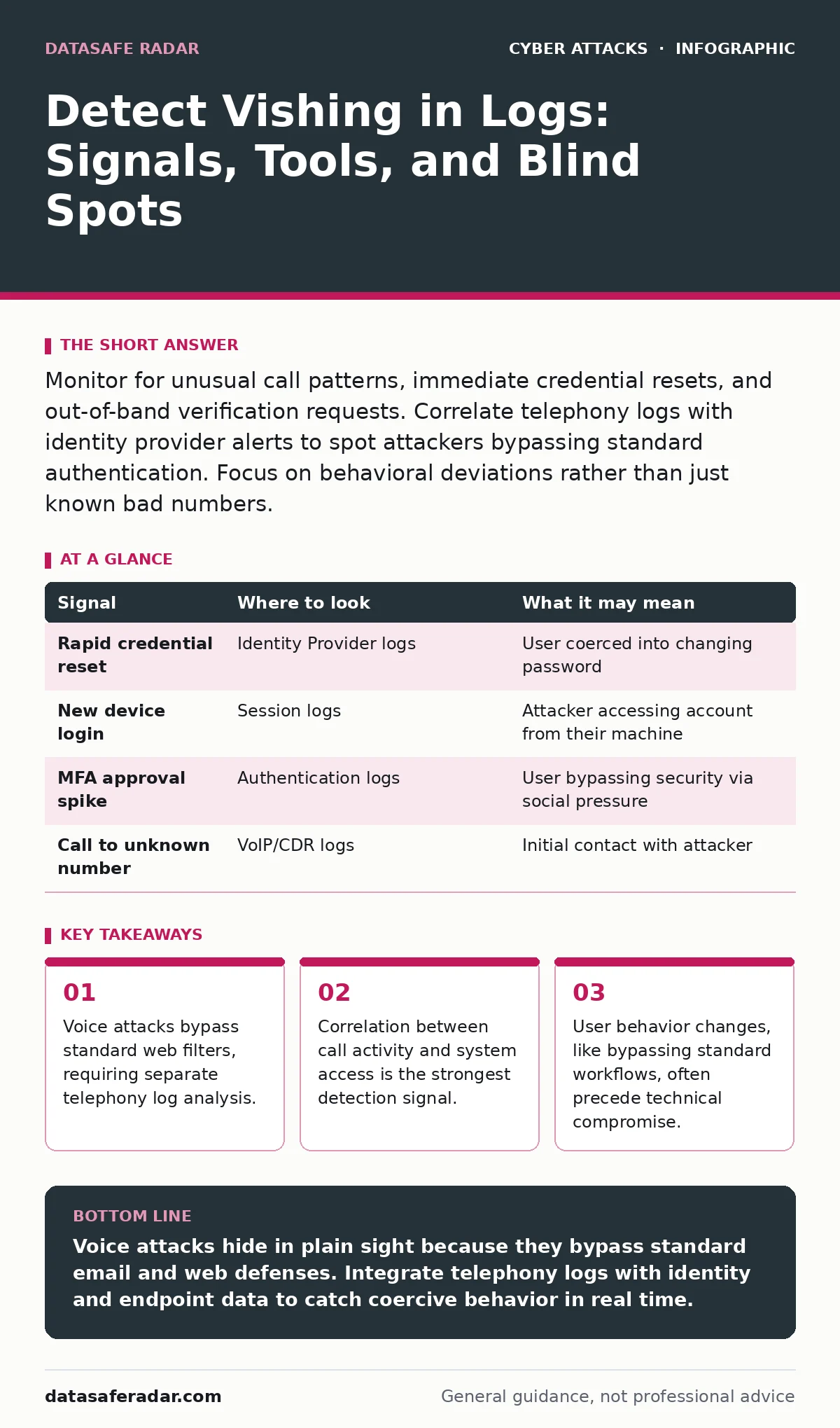
Monitor for unusual call patterns, immediate credential resets, and out-of-band verification requests. Correlate telephony logs with identity provider alerts to spot attackers bypassing standard authentication. Focus on behavioral deviations rather than just known bad numbers.
The Telephony Log Gap
Most security teams focus heavily on email and web traffic. They often treat phone systems as a separate, air-gapped utility. This separation creates a blind spot. Voice over Internet Protocol (VoIP) traffic travels over your network, but it rarely triggers the same security information and event management (SIEM) alerts as a phishing email.
You must ingest call detail records (CDR) into your monitoring stack. These logs contain the metadata of every call: duration, source, destination, and time. Without this data, you are flying blind regarding voice-based attacks. Standard firewall logs show that data moved, but they do not tell you what happened during the conversation.
Behavioral Indicators in Identity Logs
An attacker on the phone does not need to guess a password if they can trick a user into resetting it. Look for immediate credential changes following a call. If a user receives a call and then initiates a password reset within minutes, that is a strong signal of coercion.
Check for login attempts from new devices or locations right after a call. Attackers often ask victims to join a meeting or log in to a specific portal while on the phone. The identity provider logs will show the new session. Correlate the timestamp of the call with the timestamp of the login. A gap of less than five minutes is suspicious.
| Signal | Where to look | What it may mean |
|---|---|---|
| Rapid credential reset | Identity Provider logs | User coerced into changing password |
| New device login | Session logs | Attacker accessing account from their machine |
| MFA approval spike | Authentication logs | User bypassing security via social pressure |
| Call to unknown number | VoIP/CDR logs | Initial contact with attacker |
Out-of-Band Verification Failures
Organizations often train staff to verify identity before sharing sensitive data. Attackers know this. They instruct victims to call back a number provided by the attacker, not the official company number. This mimics a verification step but feeds the attacker more data.
Look for calls made to numbers that are not in the corporate directory. If an employee calls an external number and then immediately accesses restricted data, the sequence is wrong. The call should have been to a known, internal number for verification. The logs will show the external destination.
Endpoint Activity During Calls
While the user is on the phone, their computer is still active. Attackers often ask victims to open specific files or install software "to help with the issue." This generates distinct endpoint detection and response (EDR) events.
Watch for the launch of remote desktop tools or command-line interfaces during a call. If a user is on a VoIP call and suddenly opens a terminal window or downloads an executable, the context is likely malicious. The user is being guided to bypass security controls. The EDR logs will show the process creation. The call logs show the duration. Overlay them to find the attack.
The Human Element in Ticketing Systems
Users often create help desk tickets after being confused by an attack. They might report a "weird call" or a "strange login." These tickets are unstructured data, but they are valuable. Search for keywords like "phone," "IT support," "urgent," or "reset."
If a ticket mentions a phone call and is followed by a successful password change, flag it for manual review. The user may not realize they were compromised. They might think they were just helping IT. The ticket is their attempt to make sense of the pressure they felt.
Blind Spots in Detection
Relying on known bad numbers is ineffective. Attackers use spoofing to make calls appear to come from your own IT department or trusted vendors. The number in the logs will look legitimate. You cannot block these calls at the border because they mimic trusted sources.
Another blind spot is analog phone lines. If your organization still uses traditional telephone service, these calls do not generate digital logs in your network. They leave no trace in your SIEM. You must treat any physical phone interaction with the same suspicion as a digital one.
Tooling for Correlation
You need tools that can join data from different sources. A standalone phone system log is useless. A standalone identity log is incomplete. The value comes from linking them. Use a SIEM that supports custom data ingestion from VoIP providers.
Configure rules that trigger on temporal proximity. If a call event and a security event happen within a short window, escalate the alert. This reduces noise. You are not looking for every call. You are looking for calls that coincide with sensitive actions.
The Cost of False Negatives
Missing a vishing attack is costly because the attacker gains direct access to the user's mindset. They have already established trust. They may have extracted multi-factor authentication codes. They may have installed persistence mechanisms.
Recovery is harder than in email phishing. The user feels embarrassed or manipulated. They may not report the incident immediately. Delayed reporting gives the attacker more time to move laterally. Early detection relies on automated correlation, not just human intuition.
Key takeaways
- Voice attacks bypass standard web filters, requiring separate telephony log analysis.
- Correlation between call activity and system access is the strongest detection signal.
- User behavior changes, like bypassing standard workflows, often precede technical compromise.
Voice attacks hide in plain sight because they bypass standard email and web defenses. Integrate telephony logs with identity and endpoint data to catch coercive behavior in real time.
Frequently asked questions
Can firewalls detect vishing attempts?
Firewalls can block known malicious IP addresses, but they cannot detect social engineering in voice conversations. They see data packets, not intent.
How do I handle spoofed caller IDs?
You cannot fully prevent spoofing. Train users to verify requests through a different channel, such as an internal chat, rather than calling back the displayed number.
Is VoIP more vulnerable than traditional phones?
VoIP provides more data for detection. Traditional phones leave no digital trace, making them harder to monitor and audit for security incidents.
Should I monitor all calls?
No. Focus on calls that coincide with sensitive system access, credential changes, or downloads. This reduces alert fatigue while catching high-risk behavior.
How this guide was produced: written by the DataSafe Radar editorial team with AI assistance, checked against the public references listed below, and reviewed when the facts change. See our editorial policy or report an error.