DevSecOps FAQ: How to Automate Security Without Slowing Delivery
You will learn how to embed security checks into your pipeline, manage secret leakage, and handle container risks without adding manual gatekeepers to your workflow.

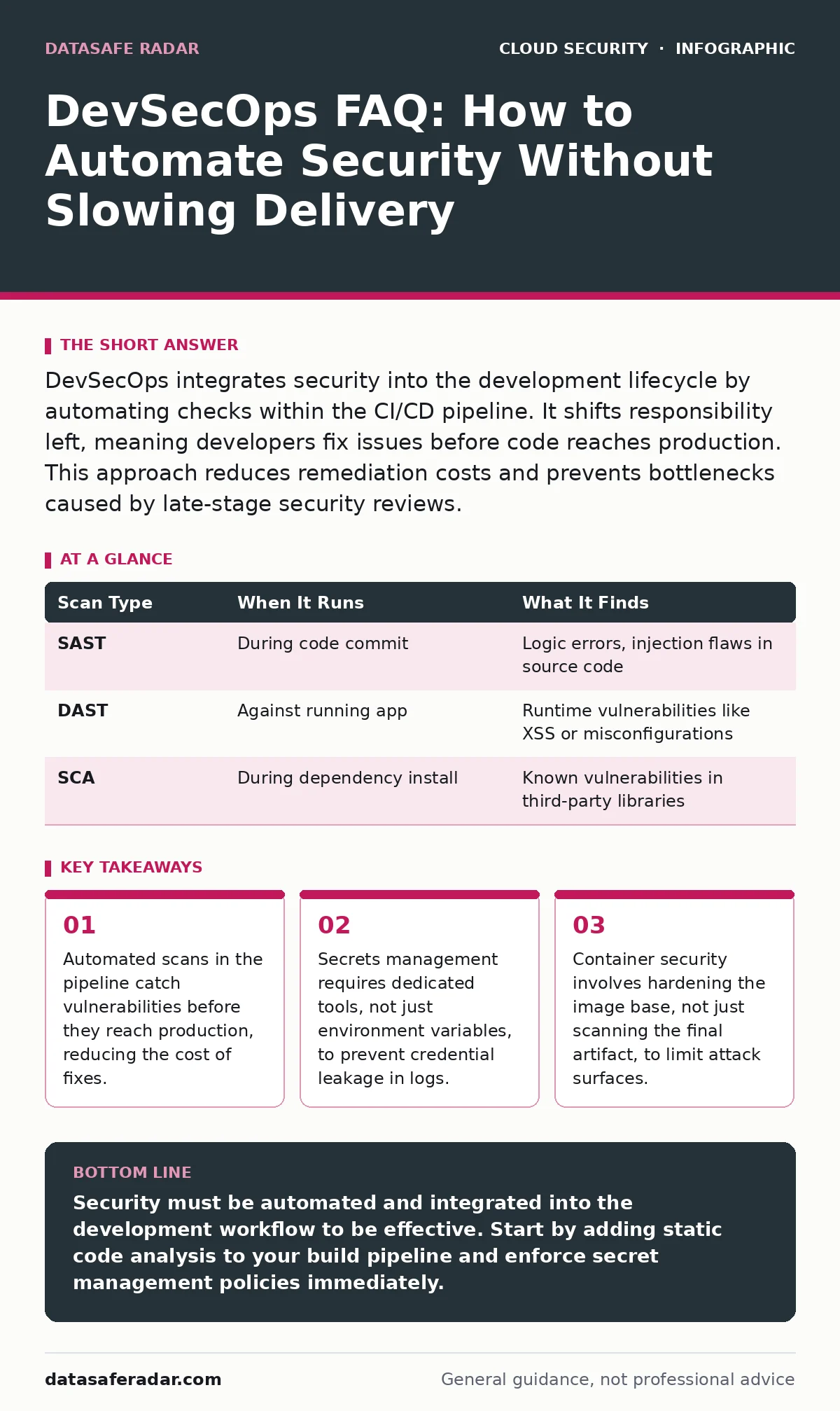
DevSecOps integrates security into the development lifecycle by automating checks within the CI/CD pipeline. It shifts responsibility left, meaning developers fix issues before code reaches production. This approach reduces remediation costs and prevents bottlenecks caused by late-stage security reviews.
What exactly is DevSecOps?
DevSecOps is the practice of integrating security tasks directly into the DevOps automation pipeline. It treats security as a shared responsibility among developers, operations, and security teams rather than a final gate. This model ensures that security checks happen continuously during the build and deployment process.
Does DevSecOps slow down development?
Yes, it can slow down initial builds if implemented poorly, but it accelerates overall delivery by preventing late-stage blockers. Traditional security reviews often halt releases at the end of a project when major flaws are found. DevSecOps catches these issues early when they are cheaper and faster to fix. The trade-off is a slightly longer build time for immediate feedback versus weeks of rework later.
How do I start without buying new tools?
Begin by adding static application security testing (SAST) to your existing continuous integration server. SAST analyzes source code for common vulnerabilities like injection flaws without executing the application. Most modern CI platforms support plugins for open-source scanners that run automatically on every commit. This requires no new infrastructure, only configuration changes to your build script.
| Scan Type | When It Runs | What It Finds |
|---|---|---|
| SAST | During code commit | Logic errors, injection flaws in source code |
| DAST | Against running app | Runtime vulnerabilities like XSS or misconfigurations |
| SCA | During dependency install | Known vulnerabilities in third-party libraries |
Why are third-party libraries a risk?
Modern applications rely heavily on open-source components that you do not write or maintain. These components may contain known vulnerabilities that attackers can exploit in your application. Software Composition Analysis (SCA) scans your dependency tree to identify these risky packages. You must update or replace vulnerable libraries, even if your own code is flawless.
How do I stop secrets from leaking?
Hardcoding passwords, API keys, or certificates in source code is a common mistake that exposes credentials to anyone with repository access. Environment variables are better but still appear in build logs and container images if not handled carefully. Use a dedicated secrets management service that injects credentials at runtime without storing them in the codebase. This ensures secrets are never written to disk or visible in version history.
See also: Cloud Workload Protection: Real Benefits vs. Hidden Costs · 7 Encrypted Cloud Storage Mistakes That Expose Your Data
What is the difference between SAST and DAST?
SAST examines the source code directly, like a spell checker for security flaws, while DAST tests the running application from the outside. SAST finds issues early in development but can produce false positives because it does not understand runtime context. DAST finds real-world exploitable bugs but runs later in the cycle when fixes are more expensive. You need both because they see different layers of the application.
How secure are my containers?
Containers share the host kernel, meaning a compromised container can potentially access the underlying system if misconfigured. Scanning the container image for vulnerabilities is necessary but insufficient if the base image is bloated with unnecessary packages. Use minimal base images that contain only the required runtime components. This reduces the number of potential attack vectors inside the container.
Who is responsible for security fixes?
Developers are responsible for fixing vulnerabilities found in their code, while operations manages the infrastructure security. Security teams define the policies and tools that automate these checks. This shared model prevents security from becoming a bottleneck owned by a single group. Clear ownership ensures that vulnerabilities are treated as bugs, not security audits.
How do I measure if DevSecOps is working?
Track the mean time to remediation, which is the average time it takes to fix a detected vulnerability. A decreasing trend indicates that your automation and feedback loops are effective. Also monitor the number of vulnerabilities reaching production, which should drop as early detection improves. These metrics show whether security is integrated or still a separate process.
Key takeaways
- Automated scans in the pipeline catch vulnerabilities before they reach production, reducing the cost of fixes.
- Secrets management requires dedicated tools, not just environment variables, to prevent credential leakage in logs.
- Container security involves hardening the image base, not just scanning the final artifact, to limit attack surfaces.
Security must be automated and integrated into the development workflow to be effective. Start by adding static code analysis to your build pipeline and enforce secret management policies immediately.
Frequently asked questions
Can I use DevSecOps for legacy applications?
Yes, but you must start with dependency scanning and infrastructure checks before attempting full code integration, as legacy code may lack the structure for automated testing.
Is DevSecOps only for cloud environments?
No, the principles apply to any environment, but cloud-native tools make automation easier and more scalable than traditional on-premise setups.
Do I need a security expert to implement this?
You need someone who understands both development workflows and security risks to configure the tools, but developers can perform the actual fixes.
What happens if a scan fails?
The build should stop automatically, forcing the developer to address the issue before the code can be merged or deployed.
How this guide was produced: written by the DataSafe Radar editorial team with AI assistance, checked against the public references listed below, and reviewed when the facts change. See our editorial policy or report an error.