7 Encrypted Cloud Storage Mistakes That Expose Your Data
Most users assume cloud encryption is automatic, but misconfigured key management and metadata leaks often render that protection useless before a breach occurs.
Avoid these common encrypted cloud storage errors by managing keys separately, scrubbing metadata, and using zero-knowledge encryption. These fixes prevent accidental data exposure and ensure only you hold the decryption capability.
Mistake 1: Trusting the Provider’s Default Encryption
Many cloud services advertise encryption as a standard feature. You upload a file, and the service encrypts it before storing it on their servers. This sounds secure, but you do not control the encryption keys. The provider holds the keys to decrypt your data. If their internal systems are compromised, or if a rogue employee accesses the backend, your data is exposed. This is not zero-knowledge encryption, where only you possess the decryption capability.
Why it hurts: You rely entirely on the vendor’s security posture. You have no way to verify if they are actually protecting your keys or if they are scanning your content for advertising or compliance purposes. A breach at the provider level immediately compromises every file you store with them.
The fix: Use client-side encryption tools that encrypt data on your device before it leaves your computer. This ensures the cloud provider only sees scrambled data. You manage the keys locally, so the provider cannot read your files even if they wanted to. For more on this architecture, see our guide on zero-knowledge encryption.
Mistake 2: Storing Keys Where the Data Lives
A common error is saving encryption keys in the same bucket or folder as the encrypted files. You might think this is convenient for recovery. However, if an attacker gains access to your storage account, they get both the lock and the key. This defeats the entire purpose of encryption. The security boundary collapses because the authentication mechanism for the storage and the decryption mechanism are coupled.
Why it hurts: Attackers often target storage credentials rather than trying to break encryption algorithms. If they find your keys alongside your data, the encryption provides zero additional security. It becomes a simple download job rather than a cryptographic challenge.
The fix: Store encryption keys in a completely separate system. Use a dedicated password manager or a hardware security key. Never store the master key in a text file on the same cloud drive. This separation ensures that compromising one system does not automatically compromise the other.
Mistake 3: Ignoring Metadata Exposure
Encryption scrambles the contents of your files, but it does not always hide the metadata. Metadata includes file names, creation dates, file sizes, and modification timestamps. An attacker or the cloud provider can still analyze this data to infer sensitive information. For example, a file named "tax_return_2023.pdf" with a specific size pattern reveals more than a generic "file1.dat".
Why it hurts: Metadata can reveal personal habits, business operations, or sensitive relationships without ever decrypting the content. This is particularly dangerous for journalists, activists, or corporate whistleblowers. The privacy breach occurs through context, not content.
The fix: Use tools that rename files to random strings before uploading. Some zero-knowledge providers offer metadata hiding features. You can also create encrypted containers or archives that bundle multiple files into a single opaque blob. Read our analysis on metadata exposure to understand the full scope of this risk.
Mistake 4: Relying on Weak or Reused Passphrases
Client-side encryption is only as strong as the passphrase you use to protect the keys. Many users create complex passwords for their email but use simple passphrases for their cloud storage keys. Others reuse the same passphrase across multiple services. If one service is breached, attackers will try that passphrase on your cloud storage.
Why it hurts: Modern cracking tools can test billions of passwords per second. A short or common passphrase will be broken quickly. If you reuse a passphrase, a breach elsewhere gives attackers a direct path to your encrypted cloud data. The encryption algorithm is secure, but the human element is not.
The fix: Generate a long, random passphrase using a password manager. Aim for at least twenty characters with mixed case, numbers, and symbols. Never reuse this passphrase anywhere else. Treat it as the master key to your digital life.
Mistake 5: Failing to Verify File Integrity
When you download encrypted files, you assume they are the same as what you uploaded. However, data corruption or tampering can occur during transmission or storage. If you do not verify the integrity of the files, you might work with corrupted data or, worse, modified data without knowing it. This is especially critical for financial records or legal documents.
Why it hurts: Silent data corruption can lead to significant errors in decision-making. If an attacker modifies the encrypted data, you might not notice until it is too late. You lose trust in your own backups because you cannot distinguish between a corrupted file and a legitimate one.
The fix: Use hashing algorithms to generate a checksum for each file before uploading. Store these checksums securely, ideally on a separate device. When you download files, recalculate the hash and compare it to the original. If they match, the file is intact. If they differ, the file has been altered or corrupted.
See also: Cloud Workload Protection: Real Benefits vs. Hidden Costs · Cloud Workload Protection Mistakes and How to Fix Them
Mistake 6: Neglecting Key Rotation
Encryption keys should not be static forever. Over time, cryptographic algorithms may become weaker, or keys may be exposed through undetected vulnerabilities. If you never rotate your keys, you leave your data vulnerable to future attacks. This is known as the "harvest now, decrypt later" threat, where attackers store encrypted data today hoping to break it tomorrow.
Why it hurts: Long-lived keys increase the window of opportunity for attackers. If a key is compromised, all data encrypted with that key remains vulnerable indefinitely. You cannot revoke access to old data if you do not change the encryption parameters.
The fix: Establish a schedule for re-encrypting your data with new keys. This process, called re-keying, ensures that even if a key is compromised, the damage is limited to the period it was active. Automate this process where possible to avoid human error.
Mistake 7: Overlooking Backup of Decryption Keys
The greatest risk in client-side encryption is losing your keys. If you lose the passphrase or the key file, your data is permanently inaccessible. The cloud provider cannot help you because they do not have the keys. This is the trade-off for true privacy. You have absolute control, but also absolute responsibility.
Why it hurts: Data loss is permanent. No amount of money or technical skill can recover data encrypted with a lost key. This is a common scenario where users panic and resort to shady recovery services, often losing more in the process.
The fix: Create multiple encrypted backups of your keys and store them in physically separate locations. Use a metal key storage device to protect against fire or water damage. Share the key with a trusted family member or attorney using a dead man's switch mechanism. Consider the principles of privacy by design when setting up your recovery plan.
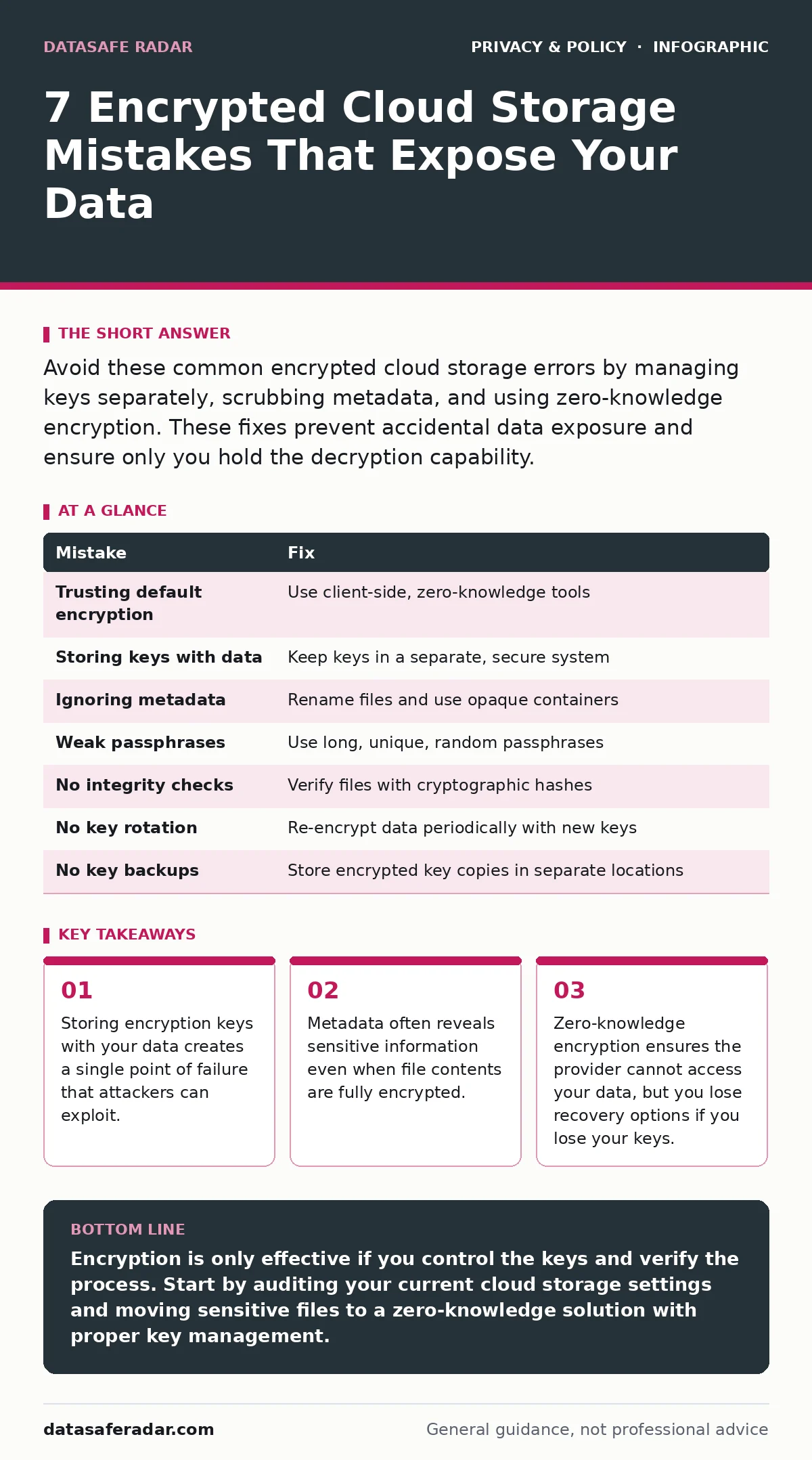
| Mistake | Fix |
|---|---|
| Trusting default encryption | Use client-side, zero-knowledge tools |
| Storing keys with data | Keep keys in a separate, secure system |
| Ignoring metadata | Rename files and use opaque containers |
| Weak passphrases | Use long, unique, random passphrases |
| No integrity checks | Verify files with cryptographic hashes |
| No key rotation | Re-encrypt data periodically with new keys |
| No key backups | Store encrypted key copies in separate locations |
Key takeaways
- Storing encryption keys with your data creates a single point of failure that attackers can exploit.
- Metadata often reveals sensitive information even when file contents are fully encrypted.
- Zero-knowledge encryption ensures the provider cannot access your data, but you lose recovery options if you lose your keys.
Encryption is only effective if you control the keys and verify the process. Start by auditing your current cloud storage settings and moving sensitive files to a zero-knowledge solution with proper key management.
Frequently asked questions
Can I use the same password for my cloud storage and email?
No, reusing passwords creates a single point of failure. If one service is breached, attackers can access your encrypted data using the same credential.
Does encryption slow down my computer?
Modern hardware handles encryption efficiently. The performance impact is negligible for most users, especially when compared to the security benefits.
What if I forget my encryption passphrase?
Your data is permanently lost. There is no backdoor. This is why secure backups of your keys are critical before you encrypt anything.
Are free cloud storage services safe for sensitive data?
Free services often monetize user data or have weaker security controls. For sensitive information, invest in a paid, zero-knowledge provider that prioritizes privacy.
How this guide was produced: written by the DataSafe Radar editorial team with AI assistance, checked against the public references listed below, and reviewed when the facts change. See our editorial policy or report an error.