RTO vs RPO: How to Set Recovery Targets That Actually Work
Most organizations confuse how fast they can restart with how much data they can afford to lose, leading to backups that run too slowly or restore too slowly.

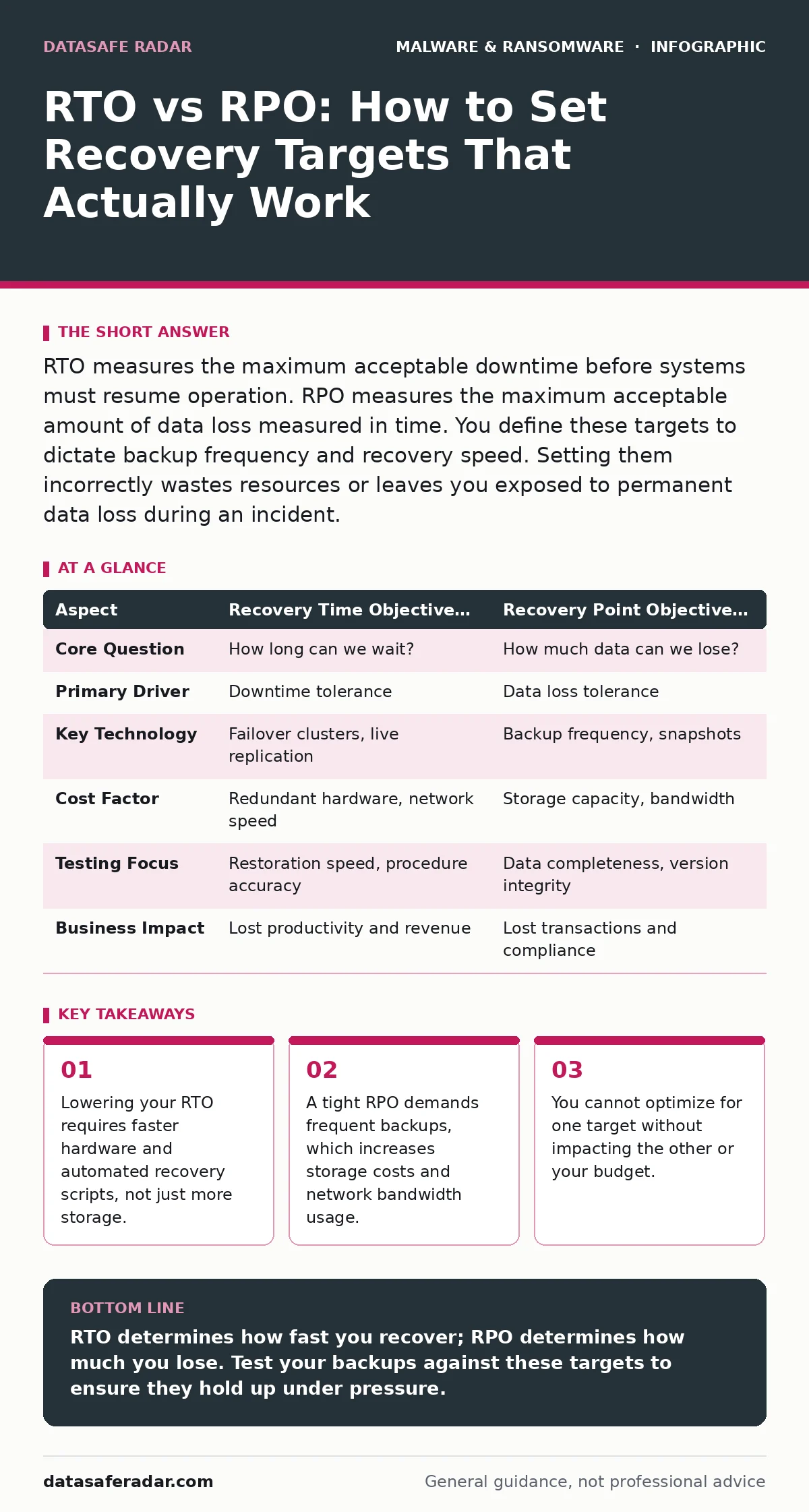
RTO measures the maximum acceptable downtime before systems must resume operation. RPO measures the maximum acceptable amount of data loss measured in time. You define these targets to dictate backup frequency and recovery speed. Setting them incorrectly wastes resources or leaves you exposed to permanent data loss during an incident.
Defining the Time Windows
Recovery Time Objective (RTO) defines the maximum length of time your systems can be offline before the impact becomes unacceptable. It is a clock that starts ticking the moment an incident occurs. If your RTO is four hours, your team must have the system running again within that window.
Recovery Point Objective (RPO) defines the maximum amount of data you can afford to lose. It is measured in time, representing the gap between the last successful backup and the moment of failure. If your RPO is one hour, you cannot lose more than sixty minutes of work.
These two metrics work together to define your disaster recovery posture. They are not technical configurations themselves, but business requirements that drive your technical choices.
The Mechanics of RTO
RTO focuses on speed and availability. It dictates how quickly you must restore services to users. A short RTO requires high-availability architectures, such as active-active clusters or instant volume replication. These systems keep a mirror of your data running in real-time so you can fail over instantly.
The cost of a low RTO is complexity. Maintaining redundant systems that are always on consumes significant resources. You must test these failover paths regularly to ensure they work when needed. If you rely on cold backups stored offsite, your RTO will be long because you must provision new hardware, restore data, and rebuild the system.
The Mechanics of RPO
RPO focuses on data completeness. It dictates how often you must capture a snapshot of your state. Continuous data protection offers an RPO near zero by logging every change transaction. Hourly backups offer an RPO of one hour.
The cost of a low RPO is storage and bandwidth. Capturing data frequently requires moving large amounts of information to your backup location. This can congest your network during business hours. It also requires more storage capacity to keep multiple versions of files for retention purposes.
If you only back up once a week, your RPO is seven days. In a ransomware attack, you might lose a week’s worth of transactions. This is often an acceptable trade-off for non-critical systems, but unacceptable for financial ledgers.
Comparing the Targets
| Aspect | Recovery Time Objective (RTO) | Recovery Point Objective (RPO) |
|---|---|---|
| Core Question | How long can we wait? | How much data can we lose? |
| Primary Driver | Downtime tolerance | Data loss tolerance |
| Key Technology | Failover clusters, live replication | Backup frequency, snapshots |
| Cost Factor | Redundant hardware, network speed | Storage capacity, bandwidth |
| Testing Focus | Restoration speed, procedure accuracy | Data completeness, version integrity |
| Business Impact | Lost productivity and revenue | Lost transactions and compliance |
Choosing the Right Balance
Choose the first when your primary concern is keeping users working. If your system is a customer-facing portal that generates revenue every second, you prioritize RTO. You invest in redundant servers and automated scripts to bring the site back online quickly. You might accept a slightly older version of the data to get the lights on faster.
Choose the second when your primary concern is preserving historical accuracy. If your system is a database of legal records or financial audits, you prioritize RPO. You invest in continuous logging and frequent snapshots. You might accept a longer downtime to ensure that every single transaction is recovered accurately.
Where They Overlap
You cannot optimize for speed without considering data integrity. A system that restores in seconds (low RTO) but contains corrupted data (poor RPO validation) is useless. The overlap lies in the verification process. You must verify that the restored data is not only available but also correct.
This overlap also affects your budget. Improving one metric often increases the cost of the other. Reducing RTO by adding real-time replication also reduces RPO to near zero, but at a high infrastructure cost. You must find the equilibrium where the cost of protection matches the value of the data.
Suppose you implement real-time protection for your endpoint security. This helps detect threats early, but it does not replace the need for backups. If fileless malware infects your system, you still need a clean recovery point. The backup strategy must align with your detection capabilities.
Common Implementation Mistakes
Many teams set ambitious targets without testing them. They define an RTO of one hour but rely on manual restoration steps that take ten. They define an RPO of fifteen minutes but only run backups nightly. This gap between policy and reality creates a false sense of security.
Another mistake is applying the same targets to all systems. Not every database requires the same protection level. Tiering your assets allows you to spend more on critical systems and less on internal wikis. This approach prevents resource waste while maintaining security.
Key takeaways
- Lowering your RTO requires faster hardware and automated recovery scripts, not just more storage.
- A tight RPO demands frequent backups, which increases storage costs and network bandwidth usage.
- You cannot optimize for one target without impacting the other or your budget.
RTO determines how fast you recover; RPO determines how much you lose. Test your backups against these targets to ensure they hold up under pressure.
Frequently asked questions
Can I have an RTO of zero?
True zero RTO is only possible with active-active architectures where traffic shifts instantly to a secondary site. This is expensive and complex to manage.
Does real-time protection replace the need for RPO?
No. Real-time protection stops threats, but if malware slips through, you still need a clean backup to restore from. RPO ensures you have a point in time before the infection.
How do I calculate my RPO?
Identify the maximum amount of work you can re-enter manually. If re-typing an hour of data is manageable, your RPO can be one hour. If it causes legal issues, your RPO must be shorter.
What is the difference between RTO and MTTR?
RTO is a target you set based on business needs. MTTR (Mean Time to Repair) is a metric you measure after incidents. You aim to keep MTTR below your RTO.
How this guide was produced: written by the DataSafe Radar editorial team with AI assistance, checked against the public references listed below, and reviewed when the facts change. See our editorial policy or report an error.