Email tracking pixels: 6 mistakes that expose you
Email tracking pixels load invisible remote graphics that share your exact reading location, device type, and open frequency with senders.
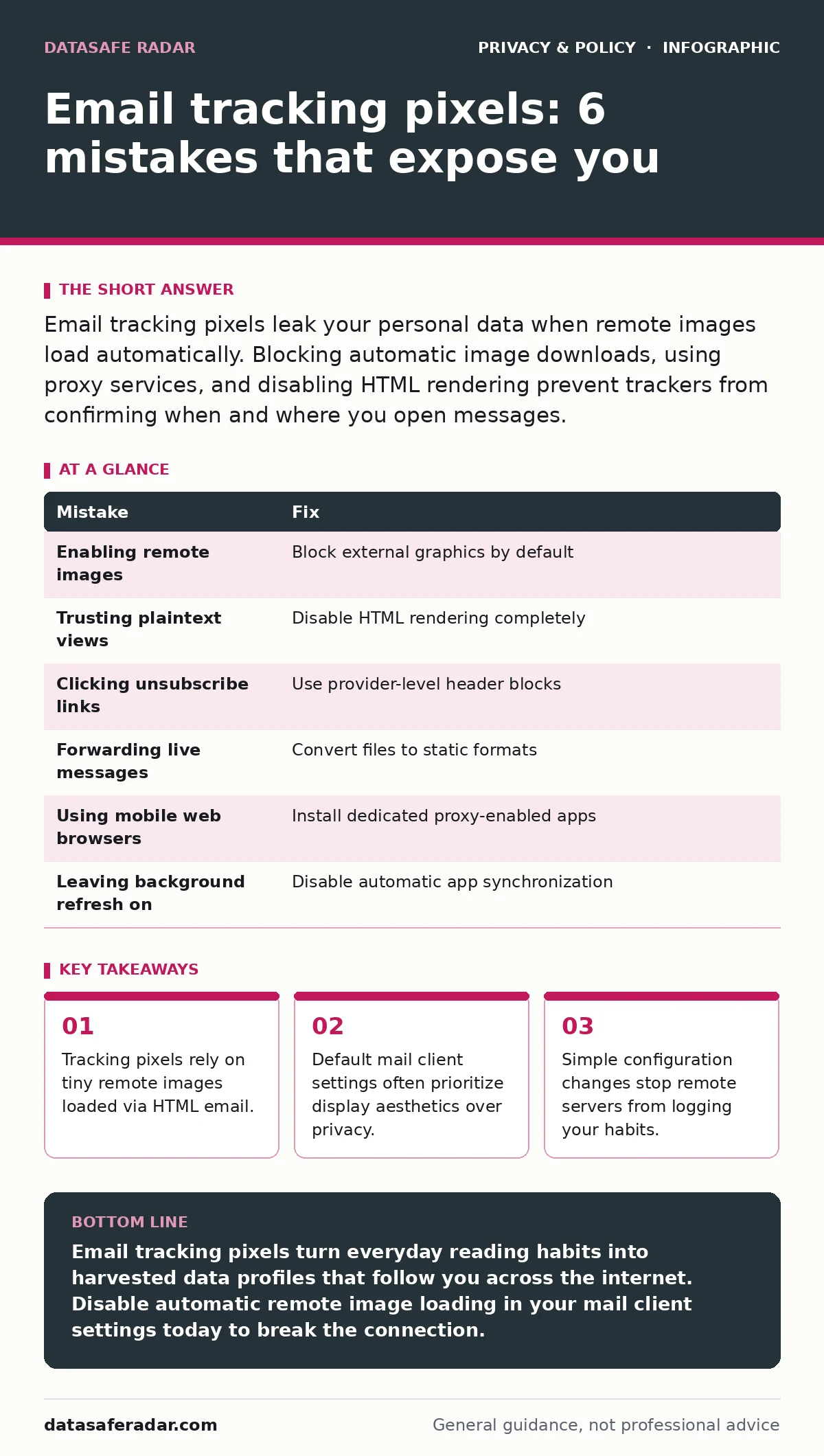
Email tracking pixels leak your personal data when remote images load automatically. Blocking automatic image downloads, using proxy services, and disabling HTML rendering prevent trackers from confirming when and where you open messages.
Mistake 1: Leaving remote images enabled by default
Why it hurts: Mail applications fetch external graphics automatically to display newsletters correctly, which forces your device to connect directly to a third-party server. That network request reveals your current internet protocol address, your exact opening timestamp, and the specific device model you hold in your hand.
The fix: Open your email client preferences and locate the display settings for incoming messages. Toggle the option that blocks remote images from loading automatically until you manually approve them for trusted senders.
Mistake 2: Trusting plaintext viewing modes blindly
Why it hurts: Reading messages in plain text strips away the visible layout, but modern tracking mechanisms sometimes bypass this limitation by embedding remote links within plain text text formatting or forcing external style sheets. You assume you are safe because no graphics appear on your screen, yet background fetches still occur silently.
The fix: Disable HTML rendering entirely for unknown senders and rely on dedicated email applications that sanitize message bodies completely. You can also review issues related to metadata exposure to understand how hidden information travels inside everyday files.
Mistake 3: Clicking unsubscribe links inside unverified mail
Why it hurts: Automated opt-out links often direct your browser to a unique web address containing a personalized identifier that confirms your active status to automated stalkers. Once you visit that address, the sender validates your inbox as a live target and increases tracking frequency.
The fix: Use built-in header removal tools provided by your email provider rather than clicking internal links within marketing messages. Block the sender directly through your account settings instead of interacting with their custom web forms.
Mistake 4: Forwarding incoming messages to secondary accounts
Why it hurts: Passing a tracked message to another inbox triggers a fresh set of remote image requests from the new destination server, duplicating your behavioral profile across multiple platforms. Imagine forwarding a newsletter to your work address, where corporate security logs intersect with commercial tracking data to map your personal reading habits.
The fix: Download messages as offline files or convert them to static formats before sharing them with other people or secondary accounts. Never forward live HTML emails containing active external links or embedded remote graphics.
Mistake 5: Reading mail inside mobile browser applications
Why it hurts: Mobile web browsers handle incoming webmail interfaces with aggressive caching and persistent session cookies that link your reading habits directly to your broader web history. Senders combine tracking pixel logs with browser fingerprinting techniques to track your identity across completely unrelated websites.
The fix: Install dedicated, privacy-focused email applications that route incoming network traffic through dedicated proxy servers. This hides your real internet address and prevents third-party scripts from reading your device characteristics.
Mistake 6: Ignoring notification badges on commercial apps
Why it hurts: Leaving push notifications active for mail clients causes background synchronization processes to fetch new messages and load remote tracking pixels automatically, even when your phone rests unused on a table. Senders log these automated background fetches as real human engagement, skewing your behavioral metrics.
The fix: Turn off background app refresh permissions for any mail software on your mobile device. Force your applications to check for new mail exclusively when you open them intentionally.
| Mistake | Fix |
|---|---|
| Enabling remote images | Block external graphics by default |
| Trusting plaintext views | Disable HTML rendering completely |
| Clicking unsubscribe links | Use provider-level header blocks |
| Forwarding live messages | Convert files to static formats |
| Using mobile web browsers | Install dedicated proxy-enabled apps |
| Leaving background refresh on | Disable automatic app synchronization |
Key takeaways
- Tracking pixels rely on tiny remote images loaded via HTML email.
- Default mail client settings often prioritize display aesthetics over privacy.
- Simple configuration changes stop remote servers from logging your habits.
Email tracking pixels turn everyday reading habits into harvested data profiles that follow you across the internet. Disable automatic remote image loading in your mail client settings today to break the connection.
Frequently asked questions
Can text-only email completely stop tracking pixels?
Text-only views stop basic image-based trackers, but advanced systems still exploit hyperlinks and style sheets embedded in the message source.
Do corporate email filters block tracking pixels automatically?
Corporate filters often strip or proxy external images for incoming mail, but mobile devices connected to corporate networks frequently bypass these protections.
How do tracking pixels affect my privacy outside of email?
Marketers connect pixel logs with advertising networks to target you with matching products across unrelated websites.
Does using a virtual private network stop email tracking pixels?
A virtual private network hides your physical location, but remote servers still record the exact moment you open a message and your connection timestamp.
How this guide was produced: written by the DataSafe Radar editorial team with AI assistance, checked against the public references listed below, and reviewed when the facts change. See our editorial policy or report an error.