How Passkeys Work Across Devices: The Sync Mechanism Explained
Passkeys bypass password theft by using cryptographic keys that never leave your device, relying on secure cloud sync to move between phones and laptops.

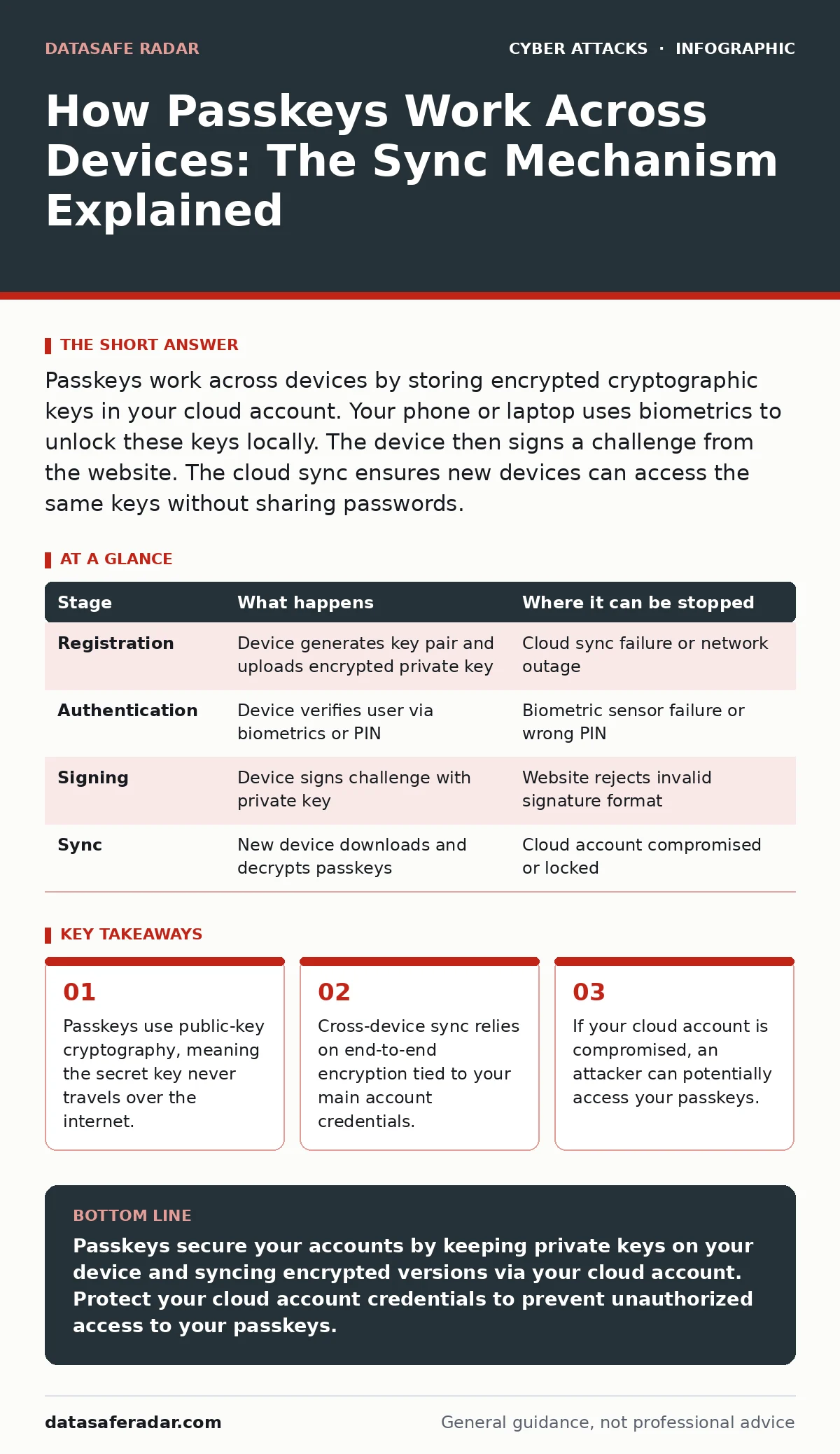
Passkeys work across devices by storing encrypted cryptographic keys in your cloud account. Your phone or laptop uses biometrics to unlock these keys locally. The device then signs a challenge from the website. The cloud sync ensures new devices can access the same keys without sharing passwords.
Understanding the Passkey Architecture
Passkeys replace passwords with a pair of cryptographic keys. One key is public, and the other is private. The public key stays with the website you are logging into. The private key stays on your device. This separation ensures that no secret value ever crosses the network during login.
When you create a passkey, your device generates this pair. The website stores the public key and associates it with your account. Your device stores the private key in a secure hardware enclave or software keystore. This keystore is protected by your device’s biometric data or PIN.
This architecture solves the problem of credential stuffing. Attackers cannot steal your private key because it never leaves your device. They also cannot guess it because it is not a reusable password. The security model shifts from something you know to something you have and are.
How Passkeys Work Across Devices
You often use multiple devices to access the same accounts. A passkey created on your phone must also work on your laptop. The system achieves this through secure cloud synchronization. Your device encrypts the private key using a master key derived from your cloud account credentials.
This encrypted package uploads to your cloud provider. When you set up a new device, you sign into your cloud account. The new device downloads the encrypted passkey package. It then uses your local biometrics or PIN to decrypt the package and store the private key in its own secure enclave.
The process ensures that you do not need to manually transfer keys. The cloud acts as a conduit, not a storage locker for usable secrets. Your cloud provider never sees the decrypted private key. This design allows seamless switching between devices while maintaining the security boundary of local authentication.
Stage 1: Registration and Key Generation
You visit a website and choose to sign up with a passkey. The website sends a challenge to your device. Your device generates a new public-private key pair. This generation happens locally within the secure enclave of your hardware.
The device sends the public key to the website. The website stores this key and links it to your user profile. The private key remains on your device. You may be asked to name the passkey for future reference. This name helps you identify which device holds the key.
If you use a cloud-synced passkey system, the device encrypts the private key. It then uploads this encrypted blob to your cloud account. This step ensures that other devices linked to your account can access the key later. The upload is encrypted end-to-end, protecting it from interception.
Stage 2: Local Authentication and Unlocking
When you return to the website, it sends a new challenge. Your device receives this challenge and prepares to respond. Before it can sign the challenge, it must verify your identity. This verification happens locally on the device.
You use your fingerprint, face scan, or PIN to unlock the secure enclave. This step proves you are the legitimate owner of the device. The system checks this biometric or PIN against the template stored in the hardware. No biometric data leaves the device during this check.
If the authentication fails, the process stops. The device will not release the private key. This local gatekeeping prevents remote attackers from using stolen credentials to bypass your security. It also protects against scenarios where your device is stolen but locked.
Stage 3: Cryptographic Signing and Verification
Once unlocked, the device uses the private key to sign the challenge. This signature is a unique mathematical proof that you possess the private key. The device sends this signature back to the website. The website does not receive your private key or any password.
The website uses the stored public key to verify the signature. If the signature matches, the website knows you are who you say you are. It then grants you access to your account. This verification is fast and happens entirely on the server side.
This mechanism is resistant to phishing. A fake website cannot generate a valid challenge for your device. Even if you enter your biometrics on a fake site, the signature will not match the legitimate server’s expectations. The domain binding ensures the key is only used for the correct website.
Stage 4: Cloud Synchronization and Recovery
If you switch devices, the cloud sync mechanism activates. Your new device logs into your cloud account. It requests the list of passkeys associated with your account. The cloud server returns the encrypted passkey packages.
Your new device decrypts these packages using your local credentials. It stores the private keys in its own secure enclave. You can now use these passkeys on the new device. This process mirrors the initial registration but pulls data from the cloud instead of generating new keys.
This sync allows you to recover access if you lose your primary device. As long as you can access your cloud account, you can restore your passkeys. This convenience introduces a new dependency on the security of your cloud account credentials.
| Stage | What happens | Where it can be stopped |
|---|---|---|
| Registration | Device generates key pair and uploads encrypted private key | Cloud sync failure or network outage |
| Authentication | Device verifies user via biometrics or PIN | Biometric sensor failure or wrong PIN |
| Signing | Device signs challenge with private key | Website rejects invalid signature format |
| Sync | New device downloads and decrypts passkeys | Cloud account compromised or locked |
Where the System Can Fail
Passkeys are not immune to all threats. The primary risk is the compromise of your cloud account. If an attacker gains access to your cloud credentials, they may access your encrypted passkeys. They would then need to install these keys on a device they control.
This scenario requires the attacker to have your cloud password and potentially bypass multi-factor authentication. Once they have access, they can decrypt and install your passkeys. They can then log into your accounts as if they were you. This is why protecting your cloud account is critical.
Another failure point is device loss. If you lose your device and cannot access your cloud account, you may be locked out. Some services offer backup codes or recovery contacts. These mechanisms provide a way to regain access without relying solely on the cloud sync.
Shoulder surfing remains a risk during the initial setup. An attacker could watch you create a passkey and note the name you give it. They could then try to impersonate you in social engineering attacks. This is why you should use generic names for passkeys, avoiding personal details.
Comparing Passkeys to Traditional Methods
Passkeys differ significantly from traditional passwords. Passwords are shared secrets known by both the user and the server. Passkeys are asymmetric keys known only by the device and the server. This difference eliminates the risk of password reuse and database breaches.
Password managers store credentials in a vault. You must remember one master password to access this vault. Passkeys eliminate the need for a master password by using device biometrics. This reduces the cognitive load on the user and removes the risk of a single password being cracked.
Intrusion detection systems can monitor for unusual login patterns. Passkeys provide a stronger baseline of security, reducing the volume of false positives. However, they do not replace the need for monitoring. An attacker with a valid passkey will look like a legitimate user.
DNS spoofing attacks can redirect you to fake websites. Passkeys protect against this by binding the key to the domain. Even if you are redirected, the fake site cannot use your passkey. This domain binding is a key advantage over traditional authentication methods.
Best Practices for Passkey Management
You should use passkeys for all supported services. This reduces your exposure to password-based attacks. Check if your favorite websites and apps support passkey login. Look for the "Sign in with Passkey" or "Use a security key" option.
Enable cloud sync for your passkeys. This ensures you can access your accounts from multiple devices. It also provides a backup in case you lose your primary device. Verify that your cloud provider uses end-to-end encryption for passkey storage.
Regularly review the devices associated with your cloud account. Remove any devices you no longer use. This reduces the attack surface for your passkeys. If you suspect a device has been compromised, revoke access immediately.
The Future of Authentication
Passkeys are becoming the standard for online authentication. Major platforms are adopting this technology. You will see fewer password fields and more biometric prompts. This shift simplifies the login process and improves security.
As adoption grows, the ecosystem will mature. New features may include shared passkeys for families or teams. These features will allow multiple users to access shared resources without sharing credentials. This will further reduce the risk of credential theft.
The technology continues to evolve. Standards bodies are working on new features to enhance usability and security. You should stay informed about these developments. Understanding how passkeys work will help you make better security decisions.
Key takeaways
- Passkeys use public-key cryptography, meaning the secret key never travels over the internet.
- Cross-device sync relies on end-to-end encryption tied to your main account credentials.
- If your cloud account is compromised, an attacker can potentially access your passkeys.
Passkeys secure your accounts by keeping private keys on your device and syncing encrypted versions via your cloud account. Protect your cloud account credentials to prevent unauthorized access to your passkeys.
Frequently asked questions
Can I use passkeys on a computer without a fingerprint reader?
Yes, you can use a linked phone to approve the login. The computer sends a request to your phone, and you approve it with your phone's biometrics. This is called "device-to-device" authentication.
Do passkeys work offline?
Yes, passkeys work offline for local authentication. The device signs the challenge using the stored private key. Cloud sync requires an internet connection to update or retrieve passkeys, but login does not.
What happens if I lose my phone and my laptop?
You can recover your passkeys by signing into your cloud account on a new device. You may need to verify your identity through additional steps, such as a recovery code or contact.
Are passkeys safe from phishing?
Yes, passkeys are resistant to phishing. The cryptographic key is bound to the specific website domain. A fake website cannot generate a valid challenge for your device, so the login will fail.
How this guide was produced: written by the DataSafe Radar editorial team with AI assistance, checked against the public references listed below, and reviewed when the facts change. See our editorial policy or report an error.