Checking if your email was in a breach and what it actually means
Searching for your email address reveals past security incidents but cannot predict where attackers will strike next.
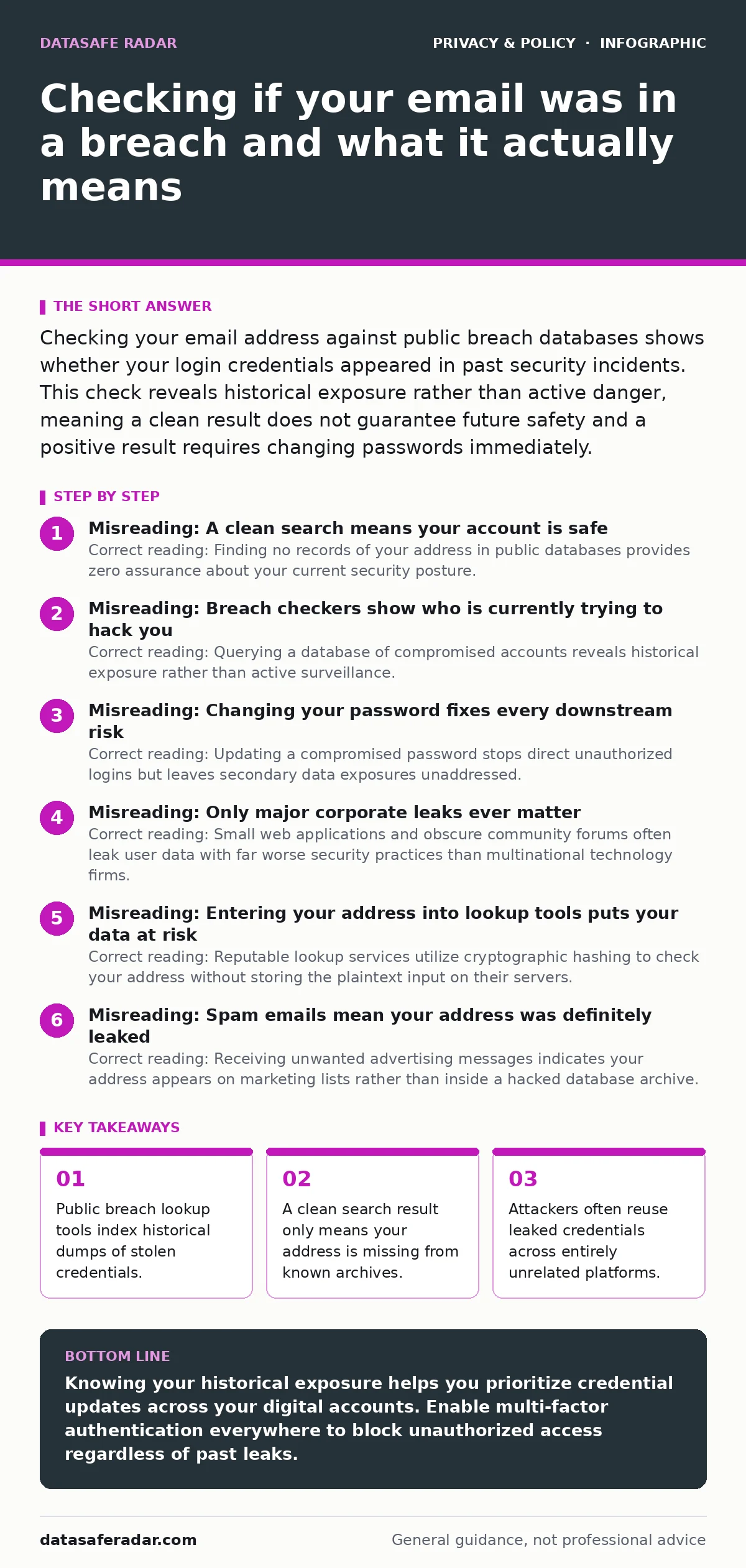
Checking your email address against public breach databases shows whether your login credentials appeared in past security incidents. This check reveals historical exposure rather than active danger, meaning a clean result does not guarantee future safety and a positive result requires changing passwords immediately.
Misreading: A clean search means your account is safe
Correct reading: Finding no records of your address in public databases provides zero assurance about your current security posture. Security researchers only index leaks that become publicly available or get leaked to researchers directly. Countless misconfigured servers and private repositories expose user data without ever hitting mainstream notification channels.
Imagine typing your address into a lookup tool and seeing a pristine record. That absence simply means your specific address has not appeared in a cataloged incident yet. Attackers constantly harvest data in targeted campaigns that bypass public disclosure requirements entirely.
Misreading: Breach checkers show who is currently trying to hack you
Correct reading: Querying a database of compromised accounts reveals historical exposure rather than active surveillance. Lookup engines store static snapshots of past security failures. These tools cannot tell you if someone is actively attempting to log into your personal accounts right now.
Smart attackers often wait months or even years before exploiting harvested credentials. They archive lists of email addresses and passwords until security teams lower their guard or drop monitoring efforts. The appearance of safety often masks a lingering exposure that predates your last password update.
Misreading: Changing your password fixes every downstream risk
Correct reading: Updating a compromised password stops direct unauthorized logins but leaves secondary data exposures unaddressed. Many database leaks include sensitive personal details, physical addresses, and security question answers that remain exposed forever. Changing a secret phrase cannot erase information that cybercriminals already downloaded to local storage drives.
Companies sometimes fail to align their data collection practices with basic data minimization principles, gathering far more information than necessary. Understanding corporate privacy policies reveals how much personal data sits vulnerable on third-party servers waiting for the next security failure.
Misreading: Only major corporate leaks ever matter
Correct reading: Small web applications and obscure community forums often leak user data with far worse security practices than multinational technology firms. Hackers frequently target niche websites because administrators lack dedicated security staff and fail to implement modern encryption standards. Your email address holds the same risk value whether it leaks from a giant retailer or a forgotten forum.
Small exposures often feed into automated credential stuffing tools where malicious software tests stolen combinations across thousands of unrelated websites. Attackers rely on human laziness, knowing that many individuals reuse the exact same secret phrase across personal and professional accounts alike.
Misreading: Entering your address into lookup tools puts your data at risk
Correct reading: Reputable lookup services utilize cryptographic hashing to check your address without storing the plaintext input on their servers. These platforms transform your email address into an irreversible string of characters before comparing it against their internal indexes. Operating this way prevents the tool operators from harvesting the very email addresses visitors try to protect.
Verifying your exposure through trusted public directories remains a safe diagnostic step. Malicious imitation sites do exist, but legitimate lookup projects rely on open transparency to maintain public trust. Reviewing how people-search sites aggregate your public profile data offers a parallel lesson in managing your digital footprint without inviting unnecessary panic.
See also: Email Encryption: Real Benefits and Hidden Limits
Misreading: Spam emails mean your address was definitely leaked
Correct reading: Receiving unwanted advertising messages indicates your address appears on marketing lists rather than inside a hacked database archive. Direct mail spammers frequently scrape public web pages, guess common name combinations, or buy shared contact lists from disreputable merchants. Junk mail is an annoying nuisance that rarely correlates with compromised login credentials or stolen passwords.
Distinguishing between targeted phishing attempts and bulk commercial spam helps you focus your defensive energy where it actually matters. Secure DNS configurations can block malicious domains, but no technical filter stops a determined marketer from guessing your name format.
Key takeaways
- Public breach lookup tools index historical dumps of stolen credentials.
- A clean search result only means your address is missing from known archives.
- Attackers often reuse leaked credentials across entirely unrelated platforms.
Knowing your historical exposure helps you prioritize credential updates across your digital accounts. Enable multi-factor authentication everywhere to block unauthorized access regardless of past leaks.
Frequently asked questions
Can a data breach checker infect my computer with malware?
Legitimate breach lookup tools run entirely inside standard web browsers using basic text inputs, meaning they cannot install software or compromise your device.
Why do my past passwords appear in search results if I already changed them?
Public lookup tools archive historical data snapshots, so old credentials remain visible even after you update your account security settings.
How often should I search for my email address in public breach databases?
Checking your address once or twice a year provides a reasonable baseline, though continuous password management matters more than frequent searches.
Does having a unique email address for every account stop data leaks?
Using unique addresses prevents attackers from linking your accounts together, but it does not protect an individual service from suffering a security breach.
How this guide was produced: written by the DataSafe Radar editorial team with AI assistance, checked against the public references listed below, and reviewed when the facts change. See our editorial policy or report an error.