7 Mistakes That Cause Subdomain Takeover and How to Fix Them
Abandoned cloud resources create open doors for attackers to host phishing pages under your trusted domain name without touching your main website code.
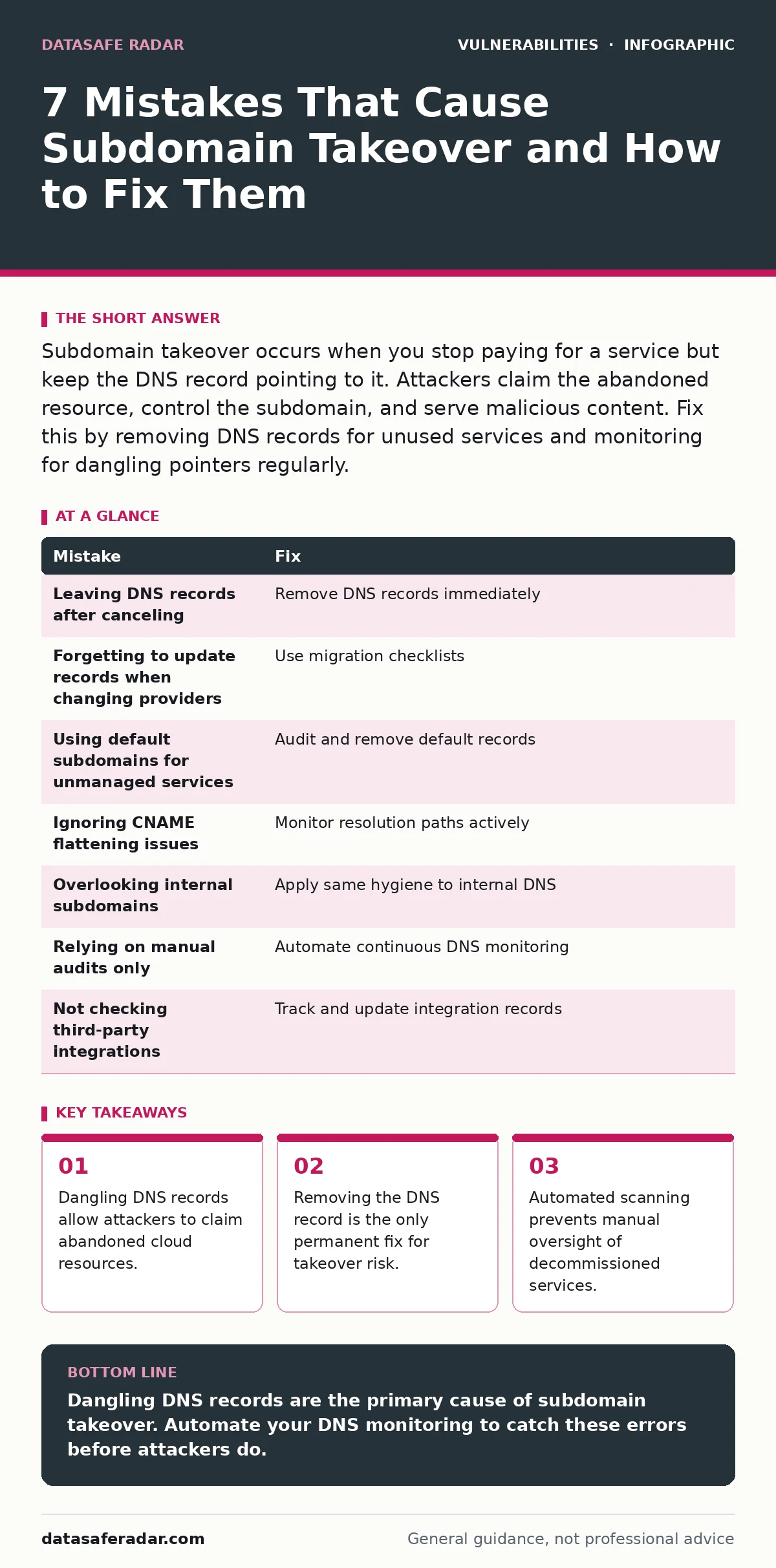
Subdomain takeover occurs when you stop paying for a service but keep the DNS record pointing to it. Attackers claim the abandoned resource, control the subdomain, and serve malicious content. Fix this by removing DNS records for unused services and monitoring for dangling pointers regularly.
Mistake 1: Leaving DNS Records After Canceling a Service
You cancel a hosting account, but the DNS record remains active. The domain name still points to an IP address or CNAME that no longer belongs to you. The provider releases the resource back into the pool. An attacker registers the same resource and gains control of your subdomain. This creates a trusted entry point for malware or phishing.
Why it hurts:
The browser trusts your domain name. Users do not inspect the underlying infrastructure. When an attacker serves content from your subdomain, browser security warnings may not appear. This bypasses many user-level defenses. The attack inherits your domain reputation. Email filters may allow messages from the compromised subdomain. This amplifies the reach of social engineering campaigns.
The fix:
Remove the DNS record immediately after canceling the service. Do not wait for the cancellation to process. Verify the record is gone using a public DNS lookup tool. If you plan to reuse the service, keep the account active or update the DNS record to point to a safe placeholder. Regular audits catch records that were missed during initial decommissioning.
Mistake 2: Forgetting to Update Records When Changing Providers
You migrate a website from one cloud provider to another. You update the primary record but forget the secondary subdomain. The old provider still hosts the subdomain temporarily. You assume the migration is complete. The old resource expires. An attacker claims the old resource. The subdomain now points to attacker-controlled infrastructure while your main site remains secure.
Why it hurts:
Migration creates a window of inconsistency. DNS propagation delays can mask the error. You may see the main site working and assume all subdomains are correct. The dangling pointer persists until someone manually checks. This inconsistency is a common source of exposure. It turns a routine operational change into a security incident. The complexity of modern infrastructure makes these oversights frequent.
The fix:
Create a checklist for every migration. List every subdomain and its current target. Update or remove each record during the move. Verify the change after the TTL expires. Use a configuration management tool to track DNS changes. This ensures that every record reflects the current state of your infrastructure. Consistency prevents accidental exposure during transitions.
Mistake 3: Using Default Subdomains for Unmanaged Services
Many cloud services create default subdomains for new accounts. You sign up for a demo or trial. You never configure the subdomain. You cancel the trial. The default subdomain remains in your DNS zone. The cloud provider keeps the default route active. An attacker registers the same default path. They now control the subdomain without needing to guess your configuration.
Why it hurts:
Default configurations are public knowledge. Attackers know which services create which subdomains. They scan for these common patterns. Your negligence in removing the record gives them a free target. This mistake relies on the assumption that unused services are invisible. They are not. The DNS record is a beacon. It tells attackers exactly where to look.
The fix:
Audit your DNS zone for default subdomain patterns. Remove any records for services you do not actively manage. Do not leave default routes in place. If you use a service, configure it properly or remove the record. Treat default subdomains as high-risk assets. They require the same attention as your primary domain. Proactive removal closes this easy attack vector.
Mistake 4: Ignoring CNAME Flattening Issues
You use CNAME flattening to map subdomains to cloud load balancers. The flattening service stops working. The CNAME record remains. The target resource is deleted. The DNS record still points to the old target. The target is recycled. An attacker claims the recycled target. The CNAME now resolves to attacker-controlled infrastructure. This breaks the expected chain of trust.
Why it hurts:
CNAME flattening adds a layer of indirection. It complicates troubleshooting. You may not realize the flattening service has failed. The DNS record looks valid. The resolution path is broken. This hidden failure mode is dangerous. It persists until traffic fails or an attacker intervenes. Monitoring must check the resolution path, not just the record existence.
The fix:
Monitor the resolution of CNAME records. Check that the target resource is active. Alert if the resolution fails or changes unexpectedly. Use services that notify you of resource deletion. Do not rely on passive DNS checks. Active validation ensures that the entire chain is secure. This catches issues before attackers can exploit them.
Mistake 5: Overlooking Internal Subdomains
You secure your public-facing subdomains. You ignore internal subdomains used for testing or staging. These subdomains are not exposed to the internet. You assume they are safe. An attacker finds a way to interact with the internal network. They claim the abandoned internal resource. They use the subdomain to pivot into your network. Internal trust is exploited.
Why it hurts:
Internal subdomains often have less security. They may not be monitored. They may point to internal services that are deprecated. The assumption of isolation is false. Network boundaries are porous. An attacker inside the network can use the subdomain to access other services. This bypasses perimeter defenses. It turns a minor oversight into a major breach.
The fix:
Apply the same DNS hygiene to internal subdomains. Remove records for unused internal services. Monitor internal DNS zones for dangling pointers. Treat internal subdomains with the same rigor as public ones. Consistency prevents attackers from finding weak links. Internal security is part of overall security.
See also: End-of-Life Software Management: 8 FAQs Answered · How CVSS Scores Work: The Math Behind Vulnerability Ratings
Mistake 6: Relying on Manual Audits Only
You check your DNS records once a year. You rely on memory to track changes. New services are added. Old services are removed. You miss the changes. The DNS zone becomes stale. Dangling records accumulate. An attacker finds one. The manual audit was insufficient. The frequency of checks did not match the rate of change. This gap allows exposure to grow.
Why it hurts:
Manual audits are error-prone. They are slow. They cannot keep pace with dynamic infrastructure. The human element introduces fatigue and oversight. The DNS zone is a living document. It changes constantly. Static checks miss dynamic risks. This approach fails to provide real-time protection. It leaves you vulnerable between audits.
The fix:
Automate DNS monitoring. Use tools that scan for dangling records continuously. Alert on new or changed records. Integrate monitoring into your change management process. Automation ensures consistent coverage. It removes human error from the loop. Continuous monitoring provides immediate visibility into risks.
Mistake 7: Not Checking Third-Party Integrations
You use third-party services for analytics or support. These services use subdomains. You forget to update your DNS when you switch providers. The old subdomain remains. The old provider releases the resource. An attacker claims it. They inject scripts into your site. The third-party integration becomes a backdoor.
Why it hurts:
Third-party integrations are often overlooked. They are managed by different teams. The DNS records are not updated. The risk persists. This mistake highlights the complexity of modern web applications. Every integration is a potential vector. Neglecting these records creates hidden liabilities.
The fix:
Track all third-party integrations. Update DNS records when switching providers. Remove records for unused integrations. Coordinate with other teams to ensure consistency. Treat third-party subdomains as critical assets. Regular review prevents accumulation of risk.
| Mistake | Fix |
|---|---|
| Leaving DNS records after canceling | Remove DNS records immediately |
| Forgetting to update records when changing providers | Use migration checklists |
| Using default subdomains for unmanaged services | Audit and remove default records |
| Ignoring CNAME flattening issues | Monitor resolution paths actively |
| Overlooking internal subdomains | Apply same hygiene to internal DNS |
| Relying on manual audits only | Automate continuous DNS monitoring |
| Not checking third-party integrations | Track and update integration records |
Key takeaways
- Dangling DNS records allow attackers to claim abandoned cloud resources.
- Removing the DNS record is the only permanent fix for takeover risk.
- Automated scanning prevents manual oversight of decommissioned services.
Dangling DNS records are the primary cause of subdomain takeover. Automate your DNS monitoring to catch these errors before attackers do.
Frequently asked questions
How do I know if I have a subdomain takeover risk?
Scan your DNS zone for records pointing to inactive or deleted resources. Use online tools that check for common cloud service endpoints.
Can a subdomain takeover affect my main domain?
No, the main domain remains secure. However, the compromised subdomain can be used to launch attacks against your users or brand.
How often should I check for dangling records?
Automate the process to check continuously. Manual checks should occur at least quarterly to verify automation is working correctly.
Does HTTPS prevent subdomain takeover?
No, HTTPS encrypts traffic but does not validate ownership. Attackers can obtain certificates for the subdomain they control.
How this guide was produced: written by the DataSafe Radar editorial team with AI assistance, checked against the public references listed below, and reviewed when the facts change. See our editorial policy or report an error.