Employee Offboarding Security: The Steps and Hidden Risks
Offboarding fails because identity systems update at different speeds, leaving a window where former staff still hold valid access keys.

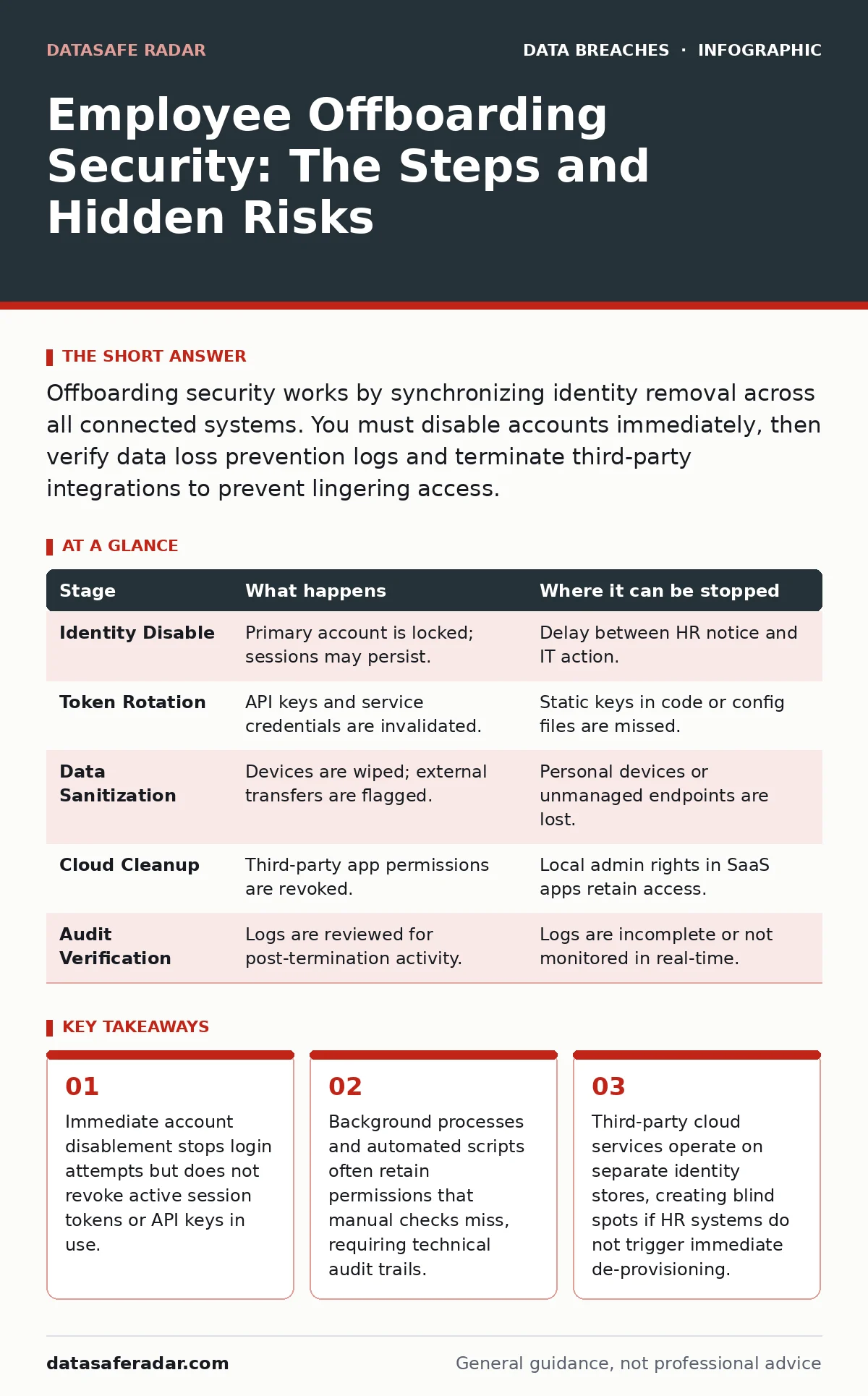
Offboarding security works by synchronizing identity removal across all connected systems. You must disable accounts immediately, then verify data loss prevention logs and terminate third-party integrations to prevent lingering access.
The Identity Disconnect
When an employee leaves, the assumption is that closing their door removes their digital access. In reality, identity management is fragmented. The human resources system records the termination, but the technical systems that grant access to email, databases, and code repositories operate independently. This gap creates a window where credentials remain valid even after the person has left the building.
The core mechanism relies on synchronization between systems. If the HR database does not automatically push a termination signal to the identity provider, manual intervention is required. Manual processes are slow and prone to error. A delay of even an hour can allow a departing employee to exfiltrate data or set up backdoors. You must treat the moment of termination as a security event, not an administrative one.
Stage One: Immediate Access Revocation
The first technical step is disabling the primary identity account. This stops new authentication attempts. However, disabling an account does not terminate existing sessions. If the user has an active browser session or a running application, they may still interact with data for the duration of that session token’s validity.
This step also includes revoking Multi-Factor Authentication devices. If the employee retains their hardware token or mobile authenticator, they could potentially bypass other controls if any secondary access method remains active. You must remove the user from all security groups and distribution lists. Leaving them in a distribution list allows them to receive internal communications, which is a privacy violation and a source of intelligence for social engineering.
Stage Two: Credential and Token Cleanup
Passwords and primary accounts are only the surface. Modern environments rely on service accounts, API keys, and application-specific tokens. These credentials often live outside the main identity directory. A developer might have stored a personal API key in a configuration file that grants write access to a production database.
Disabling the user’s main account does not invalidate these static tokens. They remain valid until they expire or are manually rotated. This is a common failure point. Attackers often use stolen API keys because they bypass multi-factor authentication entirely. You must audit all services the employee accessed to identify and rotate any associated secrets.
Stage Three: Data Retrieval and Sanitization
Hardware and local storage must be accounted for. Company devices contain cached credentials, decrypted files, and browser history. Even if the device is encrypted, the user may have exported data to personal drives or cloud accounts during their tenure.
You must wipe company devices to factory settings. This removes local caches and prevents the reuse of hardware tokens. For remote workers, you may need to remotely wipe devices. If the device is lost or stolen, you must assume the data on it is compromised. This triggers a separate incident response process. Check email archives and shared drives for any files the employee moved or shared externally. Data loss prevention tools can help identify these transfers, but they only work if configured correctly.
Stage Four: Third-Party and Cloud De-provisioning
Cloud applications often maintain their own user directories. When you disable an account in your central identity provider, it does not always automatically delete the user from SaaS applications like project management tools or communication platforms. These applications may retain the user’s data and permissions indefinitely.
You must explicitly remove the user from each third-party service. Some services allow the user to retain access if they have a local admin role within that specific application. This is a permissions escalation risk. A former employee with admin rights in a chat application can export entire conversation histories. Review subscription lists and shared workspaces. Ensure no shared accounts remain active, as these often mask individual activity.
See also: Multi-Cloud Security: Seven Practices to Stop Sprawl and Leaks · SaaS Data Exposure Prevention Checklist for Secure Apps
Stage Five: Audit and Verification
The final stage is verification. You must confirm that all access has been removed. This involves checking logs for any activity after the termination time. Look for downloads, prints, or exports. Any activity after the cutoff is a potential breach.
You should also review any automated processes that ran under the user’s identity. Cron jobs, scheduled tasks, or integration workflows may continue to run if they are tied to the user’s credentials. These processes can create new files or send data without human interaction. Update documentation to reflect the current state. This audit trail is critical for compliance and for detecting whether the offboarding was complete.
| Stage | What happens | Where it can be stopped |
|---|---|---|
| Identity Disable | Primary account is locked; sessions may persist. | Delay between HR notice and IT action. |
| Token Rotation | API keys and service credentials are invalidated. | Static keys in code or config files are missed. |
| Data Sanitization | Devices are wiped; external transfers are flagged. | Personal devices or unmanaged endpoints are lost. |
| Cloud Cleanup | Third-party app permissions are revoked. | Local admin rights in SaaS apps retain access. |
| Audit Verification | Logs are reviewed for post-termination activity. | Logs are incomplete or not monitored in real-time. |
Limits of Automated Offboarding
Automation reduces human error but introduces new risks. If the integration between HR and IT systems is misconfigured, it may disable the wrong account or fail to trigger. You must have a fallback manual process.
Even with perfect automation, you cannot control what the employee did before leaving. If they copied data to a personal cloud account months ago, offboarding procedures will not detect it. This is why ongoing monitoring is necessary. Refer to our guide on file integrity monitoring to understand how to detect unauthorized changes to critical files after access is removed. Additionally, backup testing ensures you can restore systems if a departing employee corrupts data during their notice period.
Key takeaways
- Immediate account disablement stops login attempts but does not revoke active session tokens or API keys in use.
- Background processes and automated scripts often retain permissions that manual checks miss, requiring technical audit trails.
- Third-party cloud services operate on separate identity stores, creating blind spots if HR systems do not trigger immediate de-provisioning.
Frequently asked questions
How long should I keep a terminated employee's data?
Retention policies depend on legal and business requirements, but access should be revoked immediately. Data can be archived in a secure, read-only state if needed for compliance.
What if the employee refuses to return their laptop?
Assume the device is compromised. Immediately change all passwords and credentials that were accessible on that device. Report the loss to relevant authorities if company data is sensitive.
Can I automate the entire offboarding process?
You can automate the technical steps, but human oversight is required for verification and handling edge cases like shared accounts or ongoing legal disputes.
Does offboarding protect against insider threats?
Offboarding removes access, but it does not reverse past actions. You must monitor for data exfiltration during the employee's notice period, which is a high-risk window.
How this guide was produced: written by the DataSafe Radar editorial team with AI assistance, checked against the public references listed below, and reviewed when the facts change. See our editorial policy or report an error.