Zero day virus: how unknown threats bypass defenses
A zero day virus exploits a hidden flaw before vendors issue a patch, leaving signature-based tools blind until the vulnerability is publicly known and fixed.
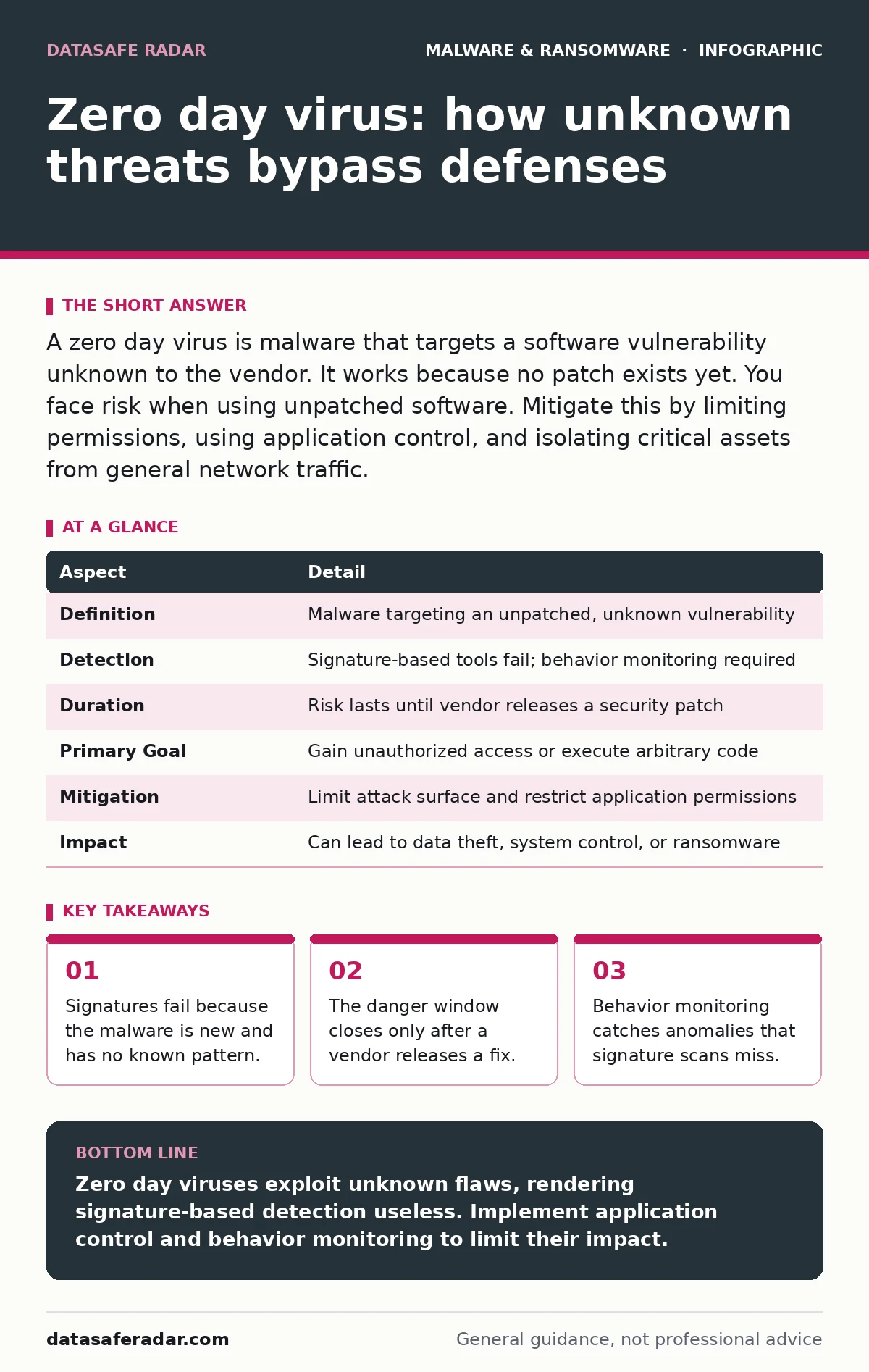
A zero day virus is malware that targets a software vulnerability unknown to the vendor. It works because no patch exists yet. You face risk when using unpatched software. Mitigate this by limiting permissions, using application control, and isolating critical assets from general network traffic.
What is a zero day virus
A zero day virus is a malicious program that exploits a software vulnerability unknown to the developer. The term "zero day" refers to the number of days the vendor has had to fix the flaw, which is zero. This lack of prior knowledge means standard security tools often cannot detect the threat. The malware operates in the blind spot between the discovery of the flaw and the release of a patch.
Attackers find these flaws through careful analysis of code or by reverse-engineering software. They build an exploit, which is a piece of code that triggers the bug. The exploit allows the malware to run with higher privileges than intended. This privilege escalation lets the virus take control of the system. The victim remains unaware because the software appears to function normally.
At a glance
| Aspect | Detail |
|---|---|
| Definition | Malware targeting an unpatched, unknown vulnerability |
| Detection | Signature-based tools fail; behavior monitoring required |
| Duration | Risk lasts until vendor releases a security patch |
| Primary Goal | Gain unauthorized access or execute arbitrary code |
| Mitigation | Limit attack surface and restrict application permissions |
| Impact | Can lead to data theft, system control, or ransomware |
How it works in practice
The attack begins with delivery. The attacker sends the zero day virus via email, a compromised website, or a malicious download. The payload remains dormant until the user interacts with it. Once active, the exploit searches for the specific vulnerability in the target software. If the software is installed and vulnerable, the exploit executes.
The malware then establishes persistence. It may modify system files or create new user accounts. This step ensures the attacker retains access even after a reboot. The virus often communicates with a command-and-control server. This server provides further instructions or exfiltrates stolen data. The entire process happens silently, avoiding detection by traditional antivirus scans.
Who is affected by zero day threats
Every user of modern software faces some risk. However, high-value targets face greater pressure. These include government agencies, large corporations, and critical infrastructure providers. Attackers spend significant resources finding flaws in these environments. The potential reward justifies the cost of developing custom exploits.
Regular users are not immune. Attackers often use zero day viruses in broad campaigns. These campaigns target millions of devices simultaneously. The goal is to build a botnet, a network of infected computers used for further attacks. Even if you are not a high-value target, your device can become a stepping stone. This chain of compromise eventually reaches a more valuable victim.
What people usually get wrong
Many believe that antivirus software provides complete protection. This belief is dangerous. Traditional antivirus relies on signatures, which are digital fingerprints of known malware. A zero day virus has no known signature. Therefore, the antivirus cannot identify it. Relying solely on signature-based detection leaves you exposed during the zero day window.
Another common error is assuming that being offline provides safety. While air-gapped systems are harder to reach, they are not invincible. Attackers can use physical media, such as USB drives, to transfer malware. If the system runs vulnerable software, the zero day virus can execute. Physical isolation reduces risk but does not eliminate it.
Effective defenses against unknown threats
You must assume that some malware will bypass your perimeter. Defense in depth is the strategy. This means using multiple layers of security. If one layer fails, another catches the threat. Application control is a powerful tool. It allows only approved programs to run. Unknown executables are blocked by default. This stops many zero day viruses before they can execute.
Limiting user privileges is another key measure. Standard users should not have administrative rights. If a zero day virus exploits a browser flaw, limited privileges restrict its impact. The malware cannot modify system-wide settings or install other programs. This containment limits the damage. It also makes remediation faster and easier.
The role of behavioral monitoring
Since signatures fail, you need behavior-based detection. This technology looks for suspicious actions rather than known patterns. For example, if a PDF reader tries to execute a script, that is unusual. Behavioral monitoring flags this action as potentially malicious. It can block the execution or isolate the process. This approach catches zero day viruses that have no known signature.
Endpoint detection and response tools use this method. They monitor system calls, memory usage, and network connections. When they see an anomaly, they alert the security team. Some tools can automatically respond to the threat. They may kill the process or disconnect the device from the network. This rapid response limits the window of opportunity for the attacker.
Patching and vulnerability management
The only true fix for a zero day vulnerability is a patch. You must apply patches as soon as vendors release them. Delaying updates extends the period of exposure. Automated patch management helps ensure timely updates. However, testing is necessary to avoid breaking critical systems. Balance speed with stability.
Consider the concept of recovery point objective when planning your response. This metric defines the maximum acceptable data loss. If a zero day virus encrypts your files, how much data can you afford to lose? Regular backups reduce this risk. Ensure backups are offline or immutable. This prevents ransomware from encrypting your backup copies.
Understanding related threat vectors
Zero day viruses often work with other techniques. Fileless malware is one such technique. It runs in memory without writing files to disk. This makes it harder to detect with traditional tools. DLL sideloading is another method. It tricks a legitimate program into loading a malicious library. Both techniques can accompany a zero day exploit.
Real-time protection is a feature of many security suites. It scans files as they are accessed. While it helps, it is not foolproof against zero days. Adware is less dangerous but can degrade system performance. It is not a zero day threat but can coexist with malware. Screen locker ransomware locks the user out of their device. It is a different attack vector but shares the goal of disruption.
Preparing for the inevitable
No system is immune to zero day threats. You must prepare for a breach. Incident response plans should include scenarios for unknown malware. Define roles and communication channels in advance. Practice your response with tabletop exercises. This preparation reduces panic and confusion during a real event.
Monitor your networks for unusual activity. Look for large data transfers or connections to unknown servers. These signs may indicate a compromise. Engage with your security community. Share information about new threats. Collective defense strengthens everyone. Stay informed about new vulnerabilities. Subscribe to security advisories from vendors.
Key takeaways
- Signatures fail because the malware is new and has no known pattern.
- The danger window closes only after a vendor releases a fix.
- Behavior monitoring catches anomalies that signature scans miss.
Zero day viruses exploit unknown flaws, rendering signature-based detection useless. Implement application control and behavior monitoring to limit their impact.
Frequently asked questions
Can a firewall stop a zero day virus?
A firewall blocks unauthorized network traffic but cannot inspect every packet for new exploits. It helps limit communication but does not prevent initial execution.
How long does a zero day threat last?
The threat lasts until the vendor discovers the flaw and releases a patch. This window can range from days to months, depending on the complexity of the exploit.
Is encryption enough to protect against zero day malware?
Encryption protects data at rest but does not stop malware from executing. If the malware runs on an active system, it can encrypt or steal data before you notice.
What is the difference between a zero day and a backdoor?
A zero day is an unknown vulnerability. A backdoor is a hidden method of bypassing authentication. Attackers may use a zero day to install a backdoor for persistent access.
How this guide was produced: written by the DataSafe Radar editorial team with AI assistance, checked against the public references listed below, and reviewed when the facts change. See our editorial policy or report an error.