Vulnerability Prioritization for Small Businesses
Small teams waste resources patching low-risk issues while leaving critical entry points open to attackers who exploit human error.

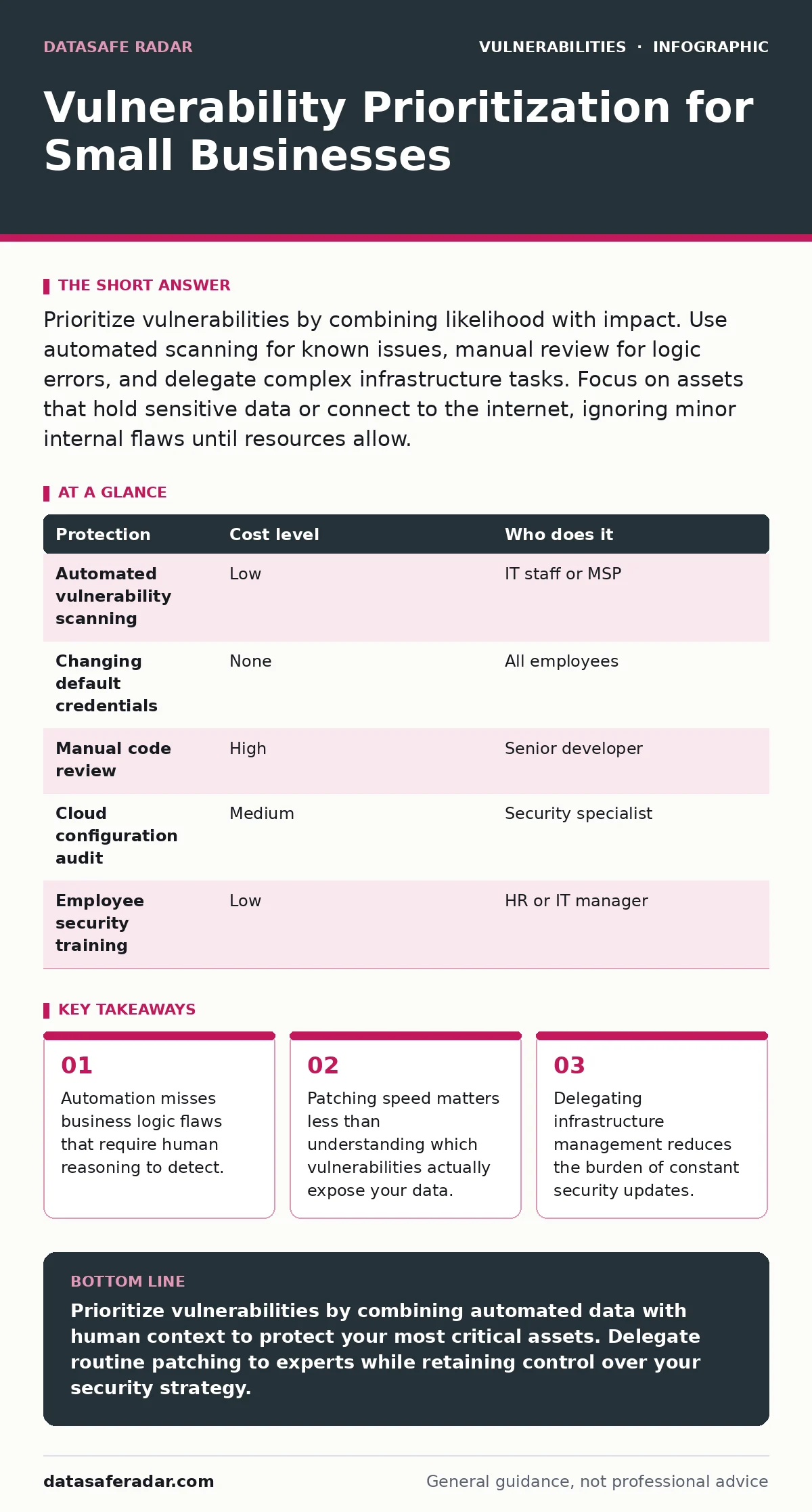
Prioritize vulnerabilities by combining likelihood with impact. Use automated scanning for known issues, manual review for logic errors, and delegate complex infrastructure tasks. Focus on assets that hold sensitive data or connect to the internet, ignoring minor internal flaws until resources allow.
The Cost of Equal Attention
You cannot fix everything at once. Every vulnerability looks urgent when you read about it in a security alert. Treating every issue as a crisis burns out your staff and drains your budget. This approach leaves the most dangerous holes open because you run out of time and energy.
Prioritization is the act of deciding which weaknesses to fix first. It forces you to distinguish between a noise and a threat. A noise is a technical flaw that an attacker cannot easily exploit or that causes little damage. A threat is a flaw that an attacker can use to steal data or disrupt operations.
Small teams often lack the personnel to monitor every system continuously. This scarcity makes prioritization a survival mechanism, not just a best practice. If you patch randomly, you are guessing. If you prioritize, you are making a calculated decision based on risk.
Understanding the Threat Model
Not all vulnerabilities are created equal. Some require physical access to your office. Others can be exploited from anywhere in the world. You must separate these two categories immediately.
Remote-accessible systems demand the highest priority. These include web servers, email gateways, and cloud storage accounts. An attacker needs only an internet connection to target them. Internal systems, like a printer in the breakroom, pose a lower risk unless they connect to the internet.
Consider the concept of attack surface. This is the total sum of points where an unauthorized user can try to enter or extract data from your environment. Reducing your attack surface is often more effective than patching every hole. Shutting down unused services shrinks the surface. Leaving them open with patches creates a constant maintenance burden.
Automation and Its Blind Spots
Automated scanning tools are affordable and fast. They check your systems against a database of known weaknesses. This database includes entries with a CVSS score, which rates the severity of a vulnerability on a standard scale.
These tools are excellent for finding missing updates. They will tell you that your operating system is outdated. They will identify open ports that should be closed. However, they cannot understand context.
A scanner cannot see business logic flaws. These are errors in how your application works, not in its code syntax. For example, a shopping cart might allow a user to apply a discount code twice. A scanner sees valid code execution. A human sees a way to steal money. You must manually review the critical workflows of your business applications.
The Human Element in Security
Technology fails when humans make mistakes. Default credentials are a persistent risk. Many devices ship with admin/admin or admin/password. Attackers scan the internet for these known combinations.
You must change these passwords immediately. This is a low-cost, high-impact action. It takes minutes but prevents thousands of automated attacks.
Another human risk is misconfiguration. Cloud storage buckets often leak data because an employee sets them to public by accident. Training your staff on basic security hygiene reduces this risk. They should know not to share screens in public and to verify email sender addresses.
| Protection | Cost level | Who does it |
|---|---|---|
| Automated vulnerability scanning | Low | IT staff or MSP |
| Changing default credentials | None | All employees |
| Manual code review | High | Senior developer |
| Cloud configuration audit | Medium | Security specialist |
| Employee security training | Low | HR or IT manager |
What to Delegate
You do not need to be a security expert. You need to know what to ask for. Delegating technical tasks to a Managed Service Provider (MSP) or a freelance specialist is often cheaper than hiring a full-time employee.
An MSP can handle routine patching and monitoring. They have the tools to scan your network continuously. They can alert you when a new critical vulnerability appears. This frees your internal team to focus on business operations.
However, you must still define the strategy. The provider needs to know which systems are most important. They need to know your acceptable risk level. Without this direction, they will patch everything equally, which is inefficient.
See also: How CVSS Scores Work: The Math Behind Vulnerability Ratings · How to Implement Cloud Vulnerability Management Step by Step
Questions for Your Provider
Before hiring an IT provider, ask specific questions. Do not accept vague promises of security. You need to understand their process.
- How do you prioritize patches when a new vulnerability is discovered?
- Do you use an EPSS score to estimate the likelihood of a vulnerability being exploited in the wild?
- How do you handle IoT device vulnerabilities for smart cameras or printers?
- What is your process for detecting path traversal vulnerabilities in web applications?
- How do you test for LDAP injection if we use directory services?
These questions reveal whether they rely on simple scripts or actual security expertise. An EPSS score helps them decide which patches to apply first by predicting exploitation likelihood. If they cannot answer these questions, they may not be ready for your needs.
The Hidden Cost of Complexity
Complexity is the enemy of security. The more tools you use, the more configurations you must manage. Each configuration is a potential point of failure.
Avoid buying multiple security products that overlap. A firewall and an antivirus program are different. Two firewalls from different vendors create confusion. Stick to a simple stack. Ensure each component has a clear purpose.
Regularly review your software inventory. Remove applications you no longer use. Each unused application is a door that no one watches. Closing it reduces your risk without costing money.
Building a Sustainable Routine
Security is not a one-time project. It is a continuous cycle. Establish a routine for reviewing and updating your systems.
Schedule monthly reviews of your vulnerability scan results. Check for new critical issues. Apply patches for high-risk items within a set timeframe, such as 48 hours. Lower-risk items can wait for the next maintenance window.
Document your decisions. If you choose not to patch a specific vulnerability, write down why. Maybe the system is offline. Maybe the patch breaks a critical function. This documentation helps new staff understand your risk posture.
Key takeaways
- Automation misses business logic flaws that require human reasoning to detect.
- Patching speed matters less than understanding which vulnerabilities actually expose your data.
- Delegating infrastructure management reduces the burden of constant security updates.
Prioritize vulnerabilities by combining automated data with human context to protect your most critical assets. Delegate routine patching to experts while retaining control over your security strategy.
Frequently asked questions
How often should I run vulnerability scans?
Run automated scans weekly or after any significant system change. This ensures you catch new issues before they are exploited.
Is it safe to use free scanning tools?
Free tools are useful for basic checks but may lack depth. They can miss complex vulnerabilities or provide false positives. Use them as a starting point, not a final solution.
What if a patch breaks my application?
Test patches in a staging environment first. If a patch is critical and you cannot test it, isolate the system from the internet until a workaround is found.
How do I handle legacy systems that cannot be updated?
Isolate them from the network. Use virtual patching via a firewall to block known exploit attempts. Plan for replacement as soon as possible.
How this guide was produced: written by the DataSafe Radar editorial team with AI assistance, checked against the public references listed below, and reviewed when the facts change. See our editorial policy or report an error.